AIGODLIKE/ComfyUI-BlenderAI-node
ComfyUI inside Blender: node graphs meet 3D scenes
This addon turns ComfyUI's web-based AI pipelines into native Blender nodes, so you can generate textures, animate characters, and swap meshes without leaving your viewport.
Not currently ranked — collecting fresh signals.
star history
What it does
ComfyUI-BlenderAI-node is a Blender addon that mirrors ComfyUI’s node-based AI generation system inside Blender’s interface. It converts ComfyUI nodes into Blender nodes, adds Blender-specific inputs like live camera feeds and Grease Pencil masks, and can launch or connect to an existing ComfyUI backend. You build AI pipelines—text-to-image, style transfer, animation interpolation—using the same node-graph logic, but with direct access to your 3D scene data.
The interesting bit
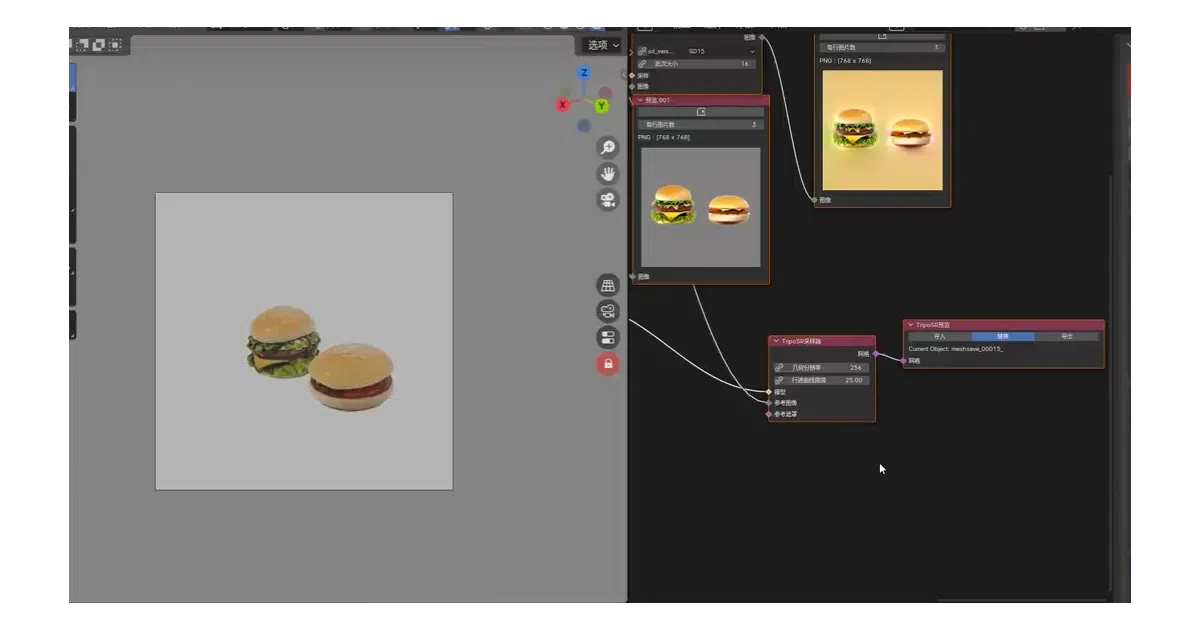
The real value is in the bidirectional glue: render frames or viewport snapshots feed straight into ControlNet, generated meshes can replace objects in the 3D viewport, and textures can be baked back onto materials via a companion addon. The authors maintain a compatibility table for dozens of third-party ComfyUI nodes, which is unusually honest about what breaks.
Key highlights
- Live camera input and real-time viewport capture as generation sources
- Grease Pencil masks and bone-driven posing integrated into AI pipelines
- Direct mesh import/replacement in the 3D viewport
- Texture baking support via separate EasyBakeNode addon
- Batch queue processing with Excel-style mission lists
- Model preview thumbnails in Load Checkpoint nodes
- Tested compatibility list for 50+ custom node packs (some marked partial or broken)
Caveats
- Linux support is explicitly partial: “Some things will not work on Linux, or might break”
- Video-related nodes are noted as problematic inside Blender
- Installation is finicky enough that the authors cite it as the cause of 90% of user failures; a major overhaul is promised for version 2026.2
- Requires correctly configured ComfyUI backend plus ControlNet models and aux nodes for full material generation
Verdict
Worth a look if you’re already invested in both Blender and ComfyUI and tired of context-switching. Skip it if you want a turnkey solution—the setup friction is real, and the project itself admits the UX is still being sorted out.
Frequently asked
- What is AIGODLIKE/ComfyUI-BlenderAI-node?
- This addon turns ComfyUI's web-based AI pipelines into native Blender nodes, so you can generate textures, animate characters, and swap meshes without leaving your viewport.
- Is ComfyUI-BlenderAI-node open source?
- Yes — AIGODLIKE/ComfyUI-BlenderAI-node is open source, released under the GPL-3.0 license.
- What language is ComfyUI-BlenderAI-node written in?
- AIGODLIKE/ComfyUI-BlenderAI-node is primarily written in Python.
- How popular is ComfyUI-BlenderAI-node?
- AIGODLIKE/ComfyUI-BlenderAI-node has 1.5k stars on GitHub.
- Where can I find ComfyUI-BlenderAI-node?
- AIGODLIKE/ComfyUI-BlenderAI-node is on GitHub at https://github.com/AIGODLIKE/ComfyUI-BlenderAI-node.