0x0funky/audioghost-ai
Type what you want gone, and it's gone
A local desktop app that wraps Meta's SAM-Audio so you can pull any described sound out of a mix, with a real editor around it.
Too new to rank. Velocity needs a few days of history.
not enough history yet
star history
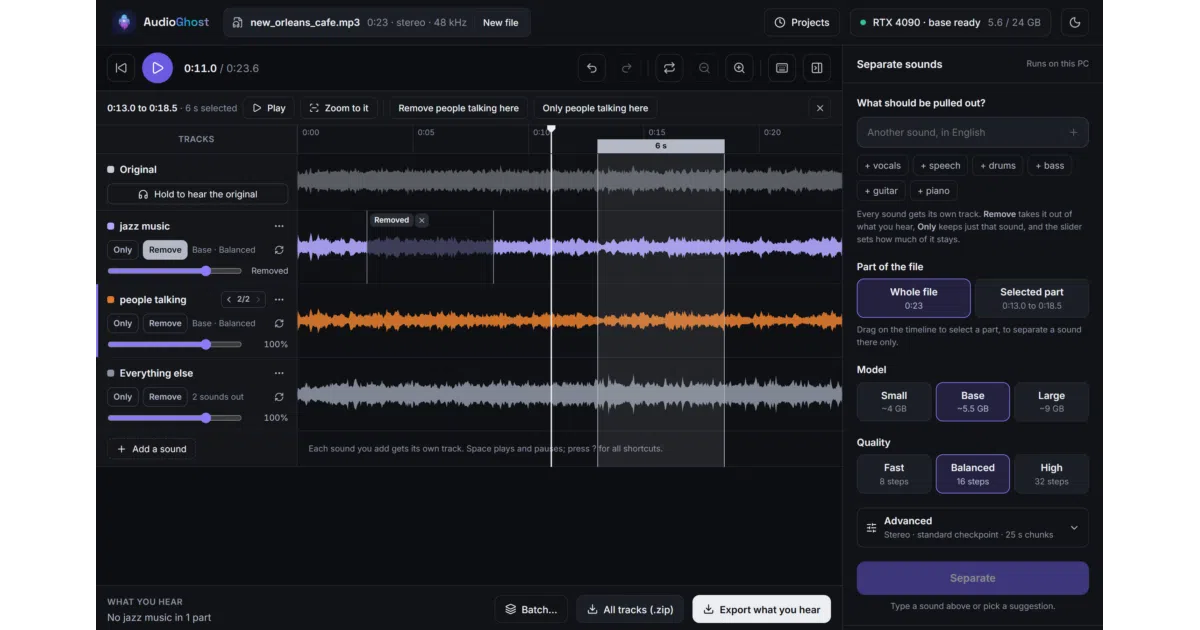
What it does: AudioGhost AI runs Meta’s SAM-Audio model on your own GPU and lets you separate sounds by describing them in text: “vocals”, “a dog barking”, “traffic”. Each sound lands on its own track, plus an “Everything else” track built from what the others left behind. You mix, export the result as 24-bit WAV, FLAC or MP3, or export your video with the new soundtrack. It runs locally, with no account to create.
The interesting bit: The engineering effort went into making SAM-Audio usable rather than reimplementing it. The authors rebuilt the model loading path so it builds only what text prompting needs and memory-maps the checkpoint, cut downloads from Meta’s 5.1 to 14.9 GB checkpoints down to 1.4 to 6.3 GB (same weights, bit for bit), and fixed precision handling that had the whole model in bf16 under fp16 autocast. The result: a 4:26 stereo song separates in 17 to 30 seconds on an RTX 4090, versus 95 to 120 seconds in v1.0.
Key highlights
- Text-guided, multi-track separation with per-track volume, mute and solo, and hold-to-hear-original
- Select a timeline region and change the mix or run separation there only
- Takes with visible seeds, so you can retry a sound and keep the best result
- Batch mode applies one project’s sounds and mix across many files
- Small model runs in about 4.2 GB of VRAM; long files process in crossfaded chunks
- Windows desktop app (beta) ships one installer with no conda, Redis or git
Caveats
- Needs an NVIDIA GPU for reasonable speed (6 GB+ VRAM for Small); Apple Silicon runs CPU-only, minutes rather than seconds
- The Windows installer is not code-signed, so Windows will warn on first run
- The stack is glue with weight: conda, Redis, a worker and a web UI, unless you use the desktop app
Verdict: Worth a look if you do audio or video editing and want prompt-based separation without a cloud service. Skip it if you lack an NVIDIA GPU or only need classic vocal/instrumental splits, which dedicated stem separators already do well.
Frequently asked
- What is 0x0funky/audioghost-ai?
- A local desktop app that wraps Meta's SAM-Audio so you can pull any described sound out of a mix, with a real editor around it.
- Is audioghost-ai open source?
- Yes — 0x0funky/audioghost-ai is an open-source project tracked on heatdrop.
- What language is audioghost-ai written in?
- 0x0funky/audioghost-ai is primarily written in Python.
- How popular is audioghost-ai?
- 0x0funky/audioghost-ai has 786 stars on GitHub.
- Where can I find audioghost-ai?
- 0x0funky/audioghost-ai is on GitHub at https://github.com/0x0funky/audioghost-ai.