palmier-io/palmier-pro · 26 Jun 2026 · Feature
Why a YC-Backed Video Editor Wants Your AI Agent in the Timeline

Christopher Nash
Contributing Editor
Palmier Pro is an open-source macOS video editor that treats generative AI as native timeline media and exposes the entire project to external agents via MCP.
palmier-io/palmier-pro
★14.5k stars Velocity · 7d +6.1 ★/day ↗accelerating
star history
The Hype: When the Timeline Became an API
Palmier Pro arrived with the pedigree of a Y Combinator S24 cohort and the swagger of a team betting that video editing is about to be unbundled by agents. The project is a Swift-native macOS video editor released under GPLv3, but the attention it has drawn stems less from its interface and more from its architecture. A sponsored placement in The Shift, a technology newsletter claiming one hundred thousand subscribers, suggests the founders understand that mindshare matters as much as code [6]. The timing is deliberate. The industry is currently obsessed with agentic workflows—tools that do not merely assist but share labor with autonomous systems. Palmier Pro leans into this by offering something its competitors do not: an open timeline that external agents can read and manipulate.
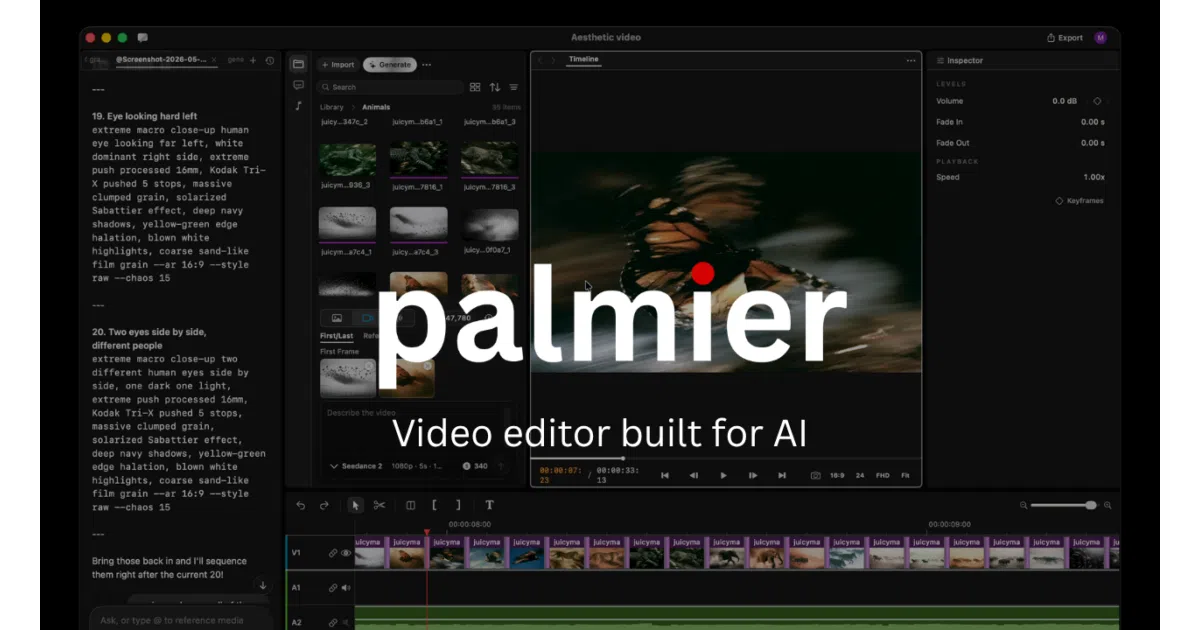
A Native Editor for Synthetic Media
At its core, Palmier Pro is an attempt to solve the fragmentation of the AI video pipeline. Today, creators typically generate footage in a browser-based model, download the results, then import them into a traditional non-linear editor like Adobe Premiere Pro or DaVinci Resolve. Palmier collapses these stages into a single application. Built from scratch in Swift with Premiere Pro as its stated north star, the editor renders a multi-track timeline where synthetic media and imported footage coexist [1]. Users can generate clips directly from state-of-the-art models including Kling V3, ByteDance’s Seedance 2.0, Google’s Veo 3.1, and xAI’s Grok Imagine [1]. The software stores per-clip metadata—prompts, model choices, reference images, and first- or last-frame locks—to enforce visual consistency across generations [12]. Finished projects export as MP4 in H.264, H.265, or ProRes, or they can be handed off via NLE XML to Premiere Pro or DaVinci Resolve for finishing [1]. The base editor is free and requires no account; only the generative features operate on a paid credit subscription [12].
Unlike the web-based wrappers that dominate the AI video space, Palmier Pro is a native application. That choice trades the easy cross-platform reach of Electron or a browser tab for the frame-accurate performance and media pipeline control that professional editors demand. It is a deliberate signal that the project intends to compete with native NLEs rather than supplement them.
This displacement of the current workflow is sensible, but not unique. Adobe Firefly already offers generative video modules, a desktop timeline with text-based editing, Quick Cut automation, and audio enhancement [5]. OpusClip claims over sixteen million creators and automates the entire social-media repurposing pipeline from clipping to captions [8]. What makes Palmier Pro different is not that it generates video inside an editor; it is how it invites outside intelligence to touch the edit.
The MCP Server: The Genuinely Interesting Part
Palmier Pro exposes a Model Context Protocol (MCP) server over local HTTP whenever the application is running. Through this interface, external agents such as Claude Desktop, Cursor, or Codex can ingest the full state of the timeline and execute edits. They can generate new shots, trim existing clips, reorder sections, or regenerate footage based on the surrounding context [12]. This is fundamentally different from the chatbot-style assistance creeping into creative suites. It is a structured, programmatic surface that treats the edit decision list as machine-readable state.
The MCP server itself is open source, bundled with the editor [1]. That means the protocol binding—the grammar by which an agent understands what is on the timeline and what it is allowed to change—is inspectable and modifiable. Even though the generative backend that actually renders pixels remains closed source and proprietary, the editorial logic is not. The philosophical shift here is significant: the editor is no longer a monolithic fortress of creative tools, but a host environment that expects to be inhabited by agents. The human remains the director, but the agent becomes a co-editor with direct access to the timeline.
Position and Limitations
The market for AI video tooling is saturated. A recent survey of the landscape counts at least fifteen major platforms—from Adobe Firefly and OpusClip to Runway and CapCut—each automating some slice of production, from transcription and captioning to clip assembly and virality scoring [11]. Palmier Pro enters this fray with a drastically narrower aperture. It runs only on macOS 26 (Tahoe) and only on Apple Silicon. Windows, Linux, and even Intel Macs are excluded entirely [12]. This is not a cross-platform play; it is a bet on the neural engines and unified memory of Apple’s latest silicon.
Moreover, the current feature set is austere. Independent reviews note the absence of color grading, transitions, motion graphics, and effects—capabilities that define even entry-level professional finishing [12]. The application is also the work of a two-person team, which explains both the velocity and the thinness [12]. The hybrid licensing model adds another layer of tension: the timeline and MCP server are open source, fostering trust and community contribution, but the actual AI generation pipeline is closed and monetized via subscription [1]. Users can inspect how their edit is structured, but not how their video is synthesized.
Against entrenched competition, these gaps are material. Adobe’s ecosystem offers decades of color science and plugin architecture. OpusClip’s scale provides a data flywheel for virality prediction. Palmier Pro offers neither. What it offers instead is a glimpse of an alternative topology: an editor whose primary interface is not just the mouse and keyboard, but the agent.
Outlook: The Open Timeline
Palmier Pro’s most durable contribution may be architectural rather than aesthetic. By open-sourcing the timeline and standardizing its agent interface on MCP, the project sketches a future where non-linear editors are less like standalone applications and more like operating systems for creative agents. Whether creators will actually delegate editorial decisions—pacing, shot selection, narrative sequencing—to a language model is still uncertain. The creative act has historically resisted full automation because taste is not a deterministic function.
Yet the direction is plausible. As generative models improve, the bottleneck in AI video production shifts from “can I generate a good clip?” to “can I manage ten thousand generated clips into a coherent story?” If that management layer is open, scriptable, and agent-native, Palmier Pro will have defined the category. The risk, of course, is that the incumbents simply bolt MCP or similar protocols onto their own established timelines. If Adobe or Blackmagic Design were to expose a comparable agent interface, Palmier Pro’s first-mover advantage in the open-source agentic niche could evaporate quickly. But incumbents move slowly, burdened by decades of legacy interface assumptions. A two-person team unencumbered by backwards compatibility can redefine the grammar of the timeline itself. Whether that grammar catches on depends less on the quality of its generative models—commodities now, available to anyone with an API key—and more on whether creators trust an agent enough to let it hold the razor.
Sources
- Palmier Pro | The video editor built for AI
- Create AI Landscape Videos Online for Free - FlexClip
- The Best AI Video Workflow Guide & Tool Stack (2026) | LTX Blog
- Landscape Video Maker - Create Wide Videos Easily with AI
- AI Video Editor | Online Video Editing - Adobe
- Palmier Pro - Newsletter Sponsor Details - SponsorGap
- Convert Landscape Videos to Portrait with Luma AI
- AI Video Editor, No Editing Skills Needed - OpusClip
- A Mac video editor you and your agent share. Clone #Shorts
- The Best AI Image Editing Tools for Landscape Photographers
- 15 best AI video editing tools for faster content production
- Palmier Pro Review: Honest Pros, Cons & Verdict - CrePal