miuuyy/codex-chatgpt-web · 31 Aug 2026 · Feature
The Browser Bridge That Makes ChatGPT a Native Codex Model

Megan Russo
Staff Writer
An unofficial launcher routes Codex tasks through ChatGPT Web—including Pro—turning a subscription chat interface into a coding agent’s reasoning engine without API fees.
miuuyy/codex-chatgpt-web
★15k stars Velocity · 7d +454 ★/day ↗accelerating
star history
OpenAI has spent the last year building two distinct products on top of the same foundation models. Codex, the company’s agentic coding harness, lives in the terminal, the IDE, and a dedicated ChatGPT tab. It executes shell commands, edits files, and runs tests. ChatGPT Web, meanwhile, remains the conversational workhorse where users plan architecture, debug logic, and argue with a model that has the full breadth of a Pro or Plus subscription. The two worlds are deliberately separate, and developers have learned to live with the partition—using ChatGPT for planning and Codex for implementation, manually ferrying context between them.
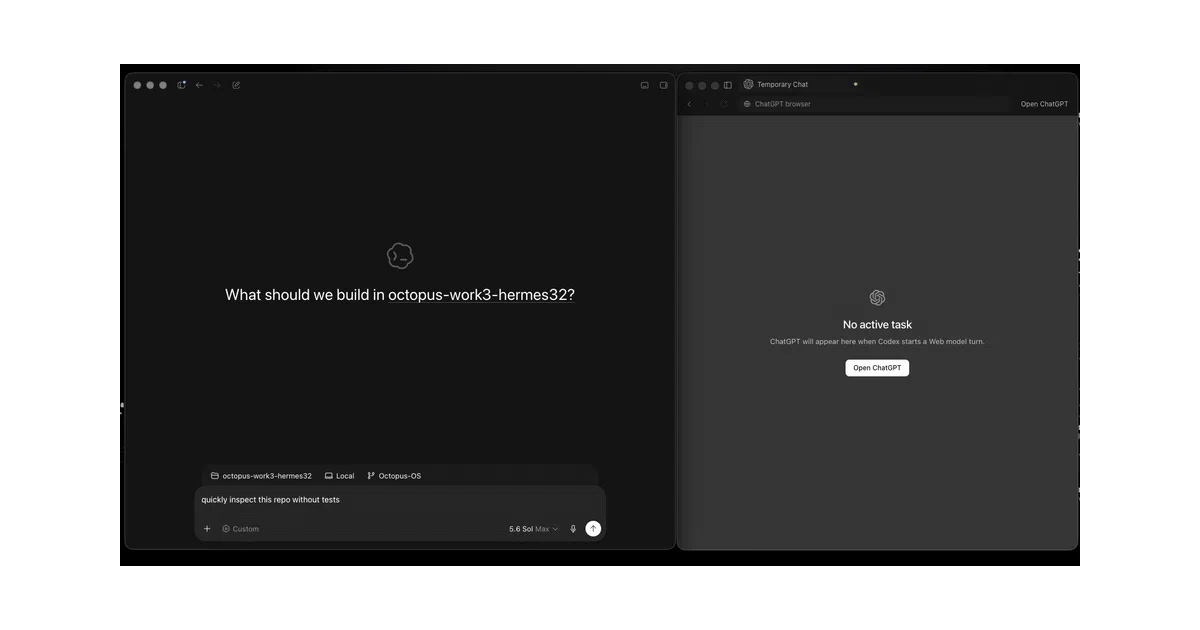
A new open-source project, codex-chatgpt-web, refuses to accept that partition. It smuggles ChatGPT Web into Codex’s native model picker, letting a user select “ChatGPT Web — Pro” as though it were just another foundation model inside the agent harness. The result is a peculiar and technically inventive bridge: an embedded browser, a local SSE relay, and—for the brave—a full MCP harness that lets ChatGPT’s web interface literally call the local tools of a Codex task. It is unofficial, fragile by design, and surprisingly polished.
The Split-Brain Workflow It Automates
The demand for this bridge was already visible in OpenAI’s own community forums. Developers describe a bifurcated workflow: they keep a ChatGPT Pro window open for high-level reasoning, then paste conclusions into Codex for execution. One user noted they “hardly write code anymore” but still spend money on both products, strategizing to reduce Codex credit burn by offloading planning to ChatGPT. Another described a loop of Pro for planning, Codex for implementation, and Pro again for review. The friction is not capability but plumbing; the models can do the work, but the interfaces refuse to share a task context.
codex-chatgpt-web solves the plumbing problem by treating ChatGPT Web not as a separate application but as a model endpoint. When a user selects a “ChatGPT Web” tier in Codex’s native picker, the local bridge opens a fresh ChatGPT Temporary Chat in an embedded browser, forwards the complete accumulated Codex task context—including images and prior tool results—and streams the response back into Codex’s UI as if it had come from an API model. Codex retains ownership of the task lifecycle, the tracing, and the approval UI. ChatGPT merely supplies the reasoning turn. Up to five task-bound browser tabs can run in parallel, capped to avoid hammering a single account with suspicious concurrency.
The Architecture: Browser Automation as Model Interface
What makes the project genuinely special is that it is not an API integration. There is no OpenAI API key for the ChatGPT side, no /v1/chat/completions call, no token metering. The bridge drives the actual ChatGPT Web UI through an embedded browser, intercepts the Server-Sent Event stream, and normalizes it into Codex’s expected response shape. This is browser automation repurposed as a model-provider shim.
The README is explicit about the trade-offs. Temporary Chat is used so that these injected tasks do not pollute the user’s normal ChatGPT conversation history, but the prompts are still processed by OpenAI’s servers under the account’s existing terms. The “Free AI with no API fees” badge on the repository is technically accurate—users are consuming their existing ChatGPT Plus or Pro subscription rather than paying separate model API credits—but it is not a privacy layer. It is an accounting layer.
Where the project moves from clever glue to something more architecturally interesting is its “full harness” mode. In this configuration, the bridge wires ChatGPT’s tool-calling behavior back into the local Codex task through OpenAI’s own tunnel-client and an MCP connector named exactly Codex Native. ChatGPT believes it is invoking a remote MCP server; in reality, the tunnel is outbound, hits the local bridge, and executes filesystem or shell actions against the same Codex workspace. The tool calls and their real results live inside the browser response stream. Nothing is simulated as text. For the Instant through Extra High tiers, this means ChatGPT Web can genuinely edit files and run commands inside Codex’s sandbox.
Pro, however, is the exception that proves the rule. ChatGPT Pro’s current web interface does not expose the custom MCP connector that the bridge needs, so Pro operates in a read-only capacity within the full harness. The workaround is almost comically pragmatic: use the lower tiers to gather local workspace context through MCP, then switch the model picker to Pro and let it reason over the accumulated state. Pro cannot act, but it can think about what the other tiers have already touched.
Fail-Closed Engineering in Unofficial Territory
Browser automation projects usually die when the target site redesigns a div. The author of this bridge knows it. Rather than pretending the selectors are stable, the project adopts a fail-closed posture: if the ChatGPT UI drifts and an expected element disappears, the bridge throws an explicit error instead of silently falling back to a different model or transport. Model selection, long inline context, image attachments, streaming, visible trace compaction, native tool rounds, cancellation, and Pro behavior were all exercised end-to-end on macOS and Windows 11. The CI pipeline gates runtime tests and native packaging across all three desktop platforms.
That rigor is necessary because the security model is inherently messy. The bridge maintains a persistent browser profile containing a live ChatGPT session, and a local loopback listener handles the relay. Any process running as the same user can reach that listener. The documentation warns, bluntly, to never share the launcher profile and to use a trusted workstation. There are no platform signing credentials yet, so macOS Gatekeeper and Windows SmartScreen flag the installer as an unknown publisher. The SHA-256 manifest is verified by the one-command installer, but the user is still bypassing operating-system trust boundaries.
Product Tensions and the Unified Interface
The project’s existence highlights a product tension that OpenAI has not resolved. Codex and ChatGPT are converging on the same underlying technology—OpenAI’s own marketing notes that more than a million people now use Codex for non-coding work, while ChatGPT Work is built on Codex technology—yet the interfaces remain siloed with separate billing, separate context windows, and separate tool permissions. Users do not see a hard boundary between “chat” and “agent.” They see a reasoning engine and a task harness, and they want the best available model inside the harness that can actually get work done.
By forcing ChatGPT Web into Codex’s model picker, the bridge effectively argues that model tiers should be fungible across interfaces. If a user pays for Pro, they reason, they should be able to point that reasoning capacity at their local codebase without buying a second class of credits. OpenAI may eventually absorb this idea into an official feature; until then, the repository functions as a polished protest against the segmentation.
Fragility and the Road Ahead
For all its ingenuity, codex-chatgpt-web is still a tightrope walk over an undocumented UI surface. A single CSS class change in ChatGPT’s web frontend can break the selector logic and halt the bridge until a new release lands. The full harness requires an OpenAI tunnel, a free API key for tunnel authentication, and a correctly named MCP connector configured in ChatGPT’s Developer Mode—steps that sit far outside the comfort zone of a casual user. And because the project is unofficial, it lives in constant tension with OpenAI’s terms of service; the disclaimer is clear that it does not bypass authentication, but it certainly blurs the intended use of a consumer web interface.
Yet the project’s reception suggests it has struck a nerve. It automates a workflow that developers were already performing manually, and it does so while preserving the native Codex experience rather than replacing it. The long-term question is whether OpenAI will build a first-class bridge between its own products, or whether the company’s product segmentation will eventually render this kind of browser automation obsolete. Until then, the repository stands as one of the more inventive pieces of glue code in the current AI landscape: a local launcher that turns a chat window into a native model, and in doing so, asks why the boundary was ever there in the first place.
Sources
- Models
- Can ChatGPT be used for backend development? - Facebook
- Codex in ChatGPT | AI Coding Agents for Software ...
- I made ChatGPT Web (including Pro) a native model in Codex. Now on ...
- Building software with an AI team: how I built a working web app ... - Medium
- ChatGPT - Chrome Web Store
- Using ChatGPT for Planning vs Codex?
- How can a custom ChatGPT be used in programming/backend ...
- Work with Codex from anywhere
- ChatGPT 5 Pro vs Codex CLI : r/ChatGPTCoding
- Best AI coding assistants for making websites from scratch? - Reddit
- ChatGPT is now a partner for your most ambitious work