microsoft/AI-For-Beginners · 01 Aug 2026 · Feature
Microsoft’s 24-Lesson AI Syllabus Bets on Foundations Over Hype

Christopher Nash
Contributing Editor
In an era of prompt-engineering tutorials, Microsoft’s open-source curriculum teaches beginners how neural networks and expert systems actually work.
microsoft/AI-For-Beginners
★70.4k stars Velocity · 7d +34 ★/day ↘cooling
star history
Every new technology wave spawns a cottage industry of crash courses. The generative AI era is no exception: the internet is now saturated with fifteen-minute prompt-engineering videos and certificates that promise fluency in large language models without mentioning a perceptron. Into this noisy market, Microsoft’s “AI for Beginners” repository has attracted sustained attention not by chasing the latest model release, but by offering something far more old-fashioned—a 12-week, 24-lesson syllabus that treats artificial intelligence as a field of study rather than a product feature. That anachronism is precisely its appeal.
The Hype Moment: A Structured Refuge
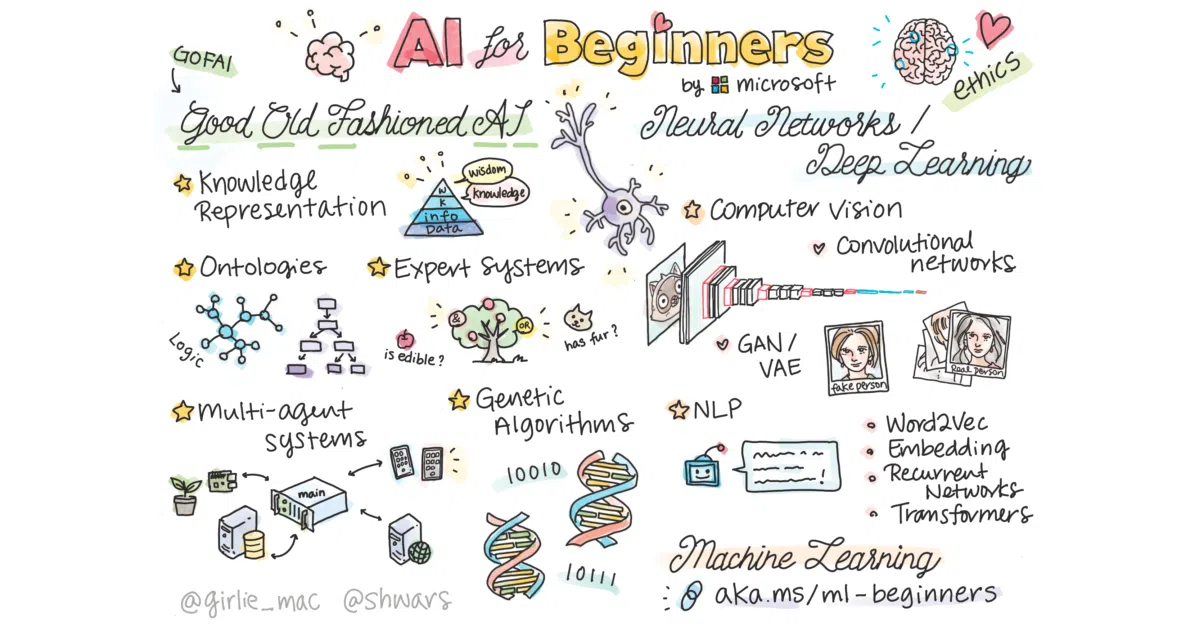
The attention spike around the repository is best understood as a reaction to overwhelm. On the DeepLearning.AI forums, non-technical consultants describe drowning in study material while trying to advise clients on AI transitions [9]. Google’s own skills catalog leans heavily into quick wins: a fifteen-minute “AI Power-Ups” course for Workspace, an “AI Essentials” video series for daily tasks, and professional certificates built around hands-on activities with Google’s stack [2]. These are useful, but they are tactical. Microsoft’s curriculum, by contrast, is strategic. It is a full semester crammed into GitHub: pre-reading, executable Jupyter notebooks, labs, quizzes, and sketchnotes, covering symbolic reasoning, neural networks, computer vision, natural language processing, and ethics [1].
The repository is also one node in a much larger Microsoft educational network. The company’s AI learning hub bundles role-based tracks for business leaders, data professionals, and security specialists alongside Azure infrastructure guidance [3], while the Educator Center pushes Copilot and AI literacy into K-12 and higher-ed classrooms [7]. Within that ecosystem, “AI for Beginners” functions as the broadest on-ramp: it requires no Azure subscription, no credit card, and no prior math beyond high-school level. That low barrier, paired with Microsoft’s institutional credibility, makes it a default bookmark for anyone asking the question posted repeatedly on Microsoft Q&A: “How do I actually start learning artificial intelligence?” [11]
What It Teaches: From Expert Systems to Transformers
The curriculum’s real distinction is scope. Most contemporary beginner resources start with 2017 and move quickly to transformer architectures. Microsoft’s syllabus begins with GOFAI—Good Old-Fashioned AI—covering knowledge representation, ontologies, and expert systems before touching a single tensor [1]. That choice is pedagogically defiant. It acknowledges that modern AI did not emerge from a vacuum, and that symbolic reasoning still matters for anyone who wants to understand why neural networks fail at structured logic.
From there, the course moves through perceptrons, multi-layered perceptrons, and a lesson in which students build a miniature neural-network framework from scratch. Only afterward does it introduce PyTorch and TensorFlow, and even then it teaches both in parallel: most lessons ship with dual-framework notebooks so learners can see concepts decoupled from syntax [1]. The computer-vision block runs through CNNs, transfer learning, autoencoders, GANs, object detection, and U-Net segmentation. The NLP block covers bag-of-words, Word2Vec, recurrent networks, transformers, BERT, and finally large language models with prompt programming. The syllabus even makes room for genetic algorithms, deep reinforcement learning, and multi-agent systems—topics increasingly exiled from mainstream bootcamps [1].
What the authors exclude is as telling as what they include. There are no business-case studies, no conversational-AI chatbot tutorials, no Azure Cognitive Services walkthroughs, and no deep mathematics [1]. Classic machine learning is explicitly punted to Microsoft’s companion “ML for Beginners” repository. These boundaries protect the course from becoming a vendor training manual, and they keep the focus on intuition and mechanics. The result is a curriculum that teaches AI as a discipline, not a dashboard.
The Translation Pipeline: Fifty Languages, One Repo
A less glamorous but genuinely unusual feature is the localization infrastructure. The repository maintains automated translations in more than fifty languages—from Arabic and Bengali to Khmer, Lithuanian, and Nigerian Pidgin—via a GitHub Action that claims to keep them always up-to-date [1]. That is not typical open-source i18n. Most educational repositories rely on stale volunteer translations or remain English-only. Here, the automation attempts to treat localization as a CI/CD problem.
The trade-off is size. The README notes that the translation files bloat the repository enough that English-only users are advised to perform a sparse checkout to avoid downloading the entire multilingual payload [1]. That friction is the physical cost of accessibility at scale. For learners in regions where English-language AI education is scarce, however, the bloat is a small price for a curriculum that meets them in their own language.
The Ecosystem Play: Azure’s Soft Sell
For all its framework agnosticism, the curriculum is still a Microsoft product, and it is not shy about pointing learners toward the company’s certification ecosystem. Lessons link to Microsoft Learn collections, and the broader learning hub steers students toward the Azure AI Fundamentals (AI-900) exam and, eventually, the Azure AI Engineer Associate (AI-102) credential [3][11]. The Q&A forums recommend the same trajectory: finish the fundamentals, build a note-summarizer project, then pursue professional certification [11].
This is a classic loss-leader strategy. The repository itself runs locally, uses open-source frameworks, and never demands an Azure login. But it sits at the top of a funnel that leads directly into Azure AI Foundry, Copilot, and the Microsoft 365 intelligence layer [3]. The syllabus is vendor-neutral in content but vendor-specific in context. For now, that balance seems stable; the material is rigorous enough to be useful even to learners who never touch Azure. Whether it stays that way depends on how aggressively future updates integrate Microsoft-specific tooling.
Limits: State-of-the-Art and Scope Cuts
The README contains an unusually candid admission: coverage of recent neural architectures “may be a bit lacking in the state-of-the-art” [1]. For a technically literate reader, that is a useful warning. You will not find the latest multimodal foundation models, diffusion fine-tuning techniques, or reinforcement-learning-from-human-feedback pipelines here. The large-language-model lesson exists, but it is framed as a capstone to twelve weeks of fundamentals, not as the centerpiece of the course.
Other omissions are deliberate but consequential. The authors explicitly defer deep mathematics to Ian Goodfellow’s textbook, classic machine learning to the sister repository, and cloud deployment to Azure-specific learning paths [1]. A student who completes all twenty-four lessons will understand how a CNN extracts features and how a transformer attends, but they will still need further study to read a contemporary research paper or productionize a model at scale. The course is foundational, not terminal.
Outlook: Foundations in a Prompt-Engineering World
The broader AI education landscape is splitting into two camps. On one side are product-centric programs—Google’s generative AI image-generation courses, Microsoft’s own eighteen-part “Generative AI for Beginners” video series, and countless prompt-engineering bootcamps—that teach students how to use AI [2][8]. On the other side are foundational courses like this one, Code.org’s K-12 AI fluency pathways, and university curricula that still begin with search algorithms and logic [12]. Microsoft’s repository sits firmly in the second camp, and its stubborn focus on perceptrons, backpropagation, and knowledge graphs feels almost retro.
That retro quality is its long-term bet. As foundation models become increasingly accessible via API, the market value of knowing how to call an endpoint will depreciate quickly. The value of knowing why the endpoint behaves as it does—why a perceptron converges, why an autoencoder compresses, why an attention head attends—will not. The risk, of course, is maintenance fatigue. Keeping fifty-plus translations current, dual-framework notebooks free of bit-rot, and lesson content aligned with a fast-moving field is expensive. If Microsoft treats the repository as a static artifact, it will become a museum piece. If it continues to fund updates as part of its broader educational mandate, it may remain one of the few free, genuinely comprehensive gateways into the field.
It is not revolutionary. It is simply a well-structured syllabus that respects the beginner’s need for depth over speed. In a market optimized for engagement metrics, that patience is rare.
Sources
- AI for Beginners
- Understanding AI: AI tools, training, and skills - Google AI
- AI learning hub - Start your AI learning journey, and build practical AI skills to ...
- I want to learn AI as a total beginner with no background whatsoever and I'm ...
- What are the best resources to learn about AI for complete ...
- Beginner Question: How Should I Start Learning AI?
- AI for education: Resources and learning opportunities
- Introduction to Generative AI and LLMs (Part 1 of 18)
- AI for absolute beginners - AI For Everyone
- Downloadable Resources — AI for Education
- How can a beginner start learning Artificial Intelligence - Microsoft Q&A
- Teach and Learn AI with Code.org | Explore AI Education