latent-spaces/brag · 25 Oct 2026 · Feature
The Last Mile of Shipping Is Now a Brag Reel

Lukas Brandt
Staff Writer
latent-spaces/brag is an agent skill that turns a finished project into a shareable launch video — and its real trick is knowing what to delegate.
latent-spaces/brag
★18.4k stars Velocity · 7d +570 ★/day ↗accelerating
star history
Every project has the same ending: it works, it’s deployed, and nobody outside the repo will ever see it. The launch video — that 20-second artifact that makes a side project look like a company — has always been the thing developers skip, because it belongs to a skill set they don’t have and a toolchain they don’t own. /brag, a small open-source agent skill from the latent-spaces org, is built around exactly this gap. Its pitch is two sentences long: you built it, now brag. One command, and your agent produces a short, shareable launch video with music, motion, and share copy.
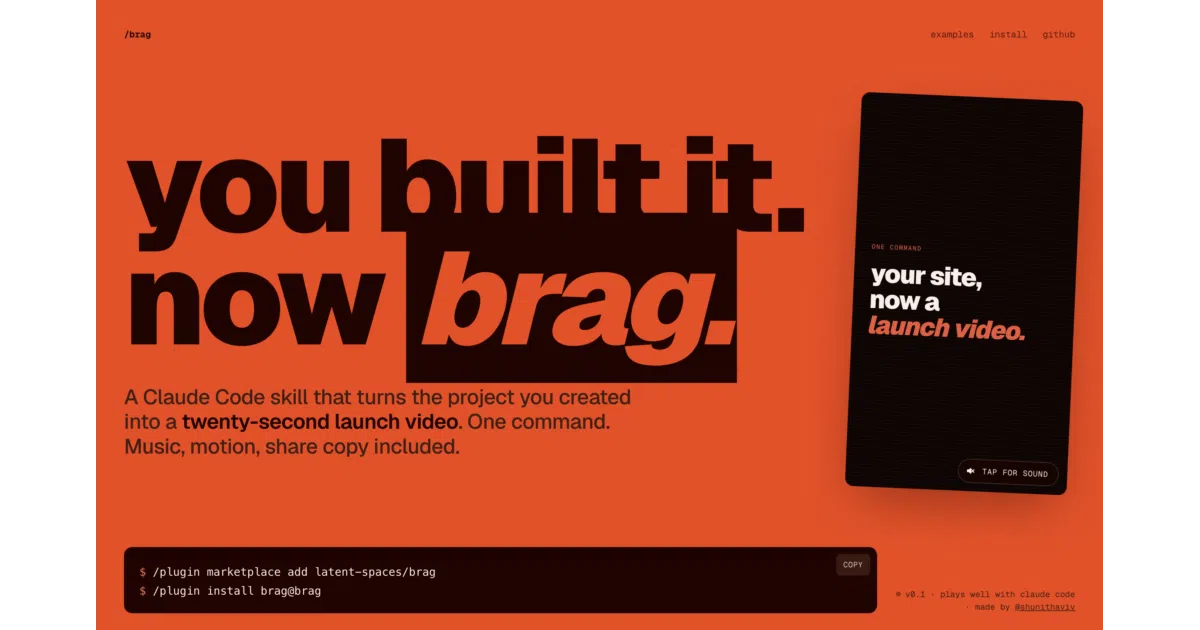
What makes it worth a closer look isn’t the video output, which is fine. It’s the architecture of the idea — a clean division of labor between an agent that owns the story and a rendering service that owns the pixels — and the unusually fussy engineering around making one skill portable across every agent CLI that matters right now.
The boring part is the insight
Strip away the swagger and /brag is a prompt with taste. The skill doesn’t render video itself. Per the README, it owns the product angle, the tone, and which moments to show, then hands a focused composition brief to Hyperframes, HeyGen’s video-generation service, which builds, times, and renders the actual MP4. The repo bundles the rest: music from ende.app, sound effects from Kenney, and a set of fake product sites in examples/ that double as a benchmark suite — a detail that suggests the authors actually test their creative rules against something.
This split is the whole design. Product launch videos fail not because rendering is hard but because the editorial decisions are: what’s the hook, what do you show in second three, what tone fits a developer tool versus a consumer app. That’s judgment work, which is precisely what a coding agent with full context on your repository is decent at. Timing, motion, and encoding are mechanical work, which is what a dedicated rendering pipeline is decent at. /brag refuses to blur the boundary. The agent doesn’t fumble with keyframes; the renderer doesn’t guess at narrative.
It’s worth being honest about what this makes the project: glue, in the flattering sense. The creative intelligence lives in the skill’s rules and references; the heavy lifting lives in a proprietary service. If Hyperframes changes or disappears, the classic workflow goes with it — a dependency the authors themselves clearly felt, which brings us to /brag-slim.
The slim variant is the more interesting artifact
The newer /brag-slim is described as “the same /brag, rebuilt lean for Opus 5.5” — no Hyperframes, no bundled assets, same creative rules, delivered as a single-file skill. On Opus 5.5 the skill switches to slim mode automatically, with an escape hatch back to the classic workflow.
Read between the lines and this is a bet on model capability. The original /brag needed a rendering service because models couldn’t reliably produce well-timed motion graphics on their own. The slim variant assumes a frontier model can — that the composition brief, the timing, and the assembly can all happen inside the agent’s own output. That’s a meaningful shift: the same repo now contains both the “delegate the hard part” version and the “the model is the hard part” version, and the authors are letting the model decide which era it’s in. Whether Opus 5.5 actually matches Hyperframes’ output quality is something the sources don’t establish — the README claims parity of intent, not of result, and that’s the kind of claim only a side-by-side watch can settle.
Portability engineering, taken unusually seriously
The least glamorous and most telling part of the repo is its discovery plumbing. Rather than pick one agent, the project exposes the skill at every major agent’s standard discovery path via symlinks — .claude/skills/ for Claude Code, .agents/skills/ for Codex CLI and opencode, .opencode/skills/ for opencode, with Google Antigravity and others covered by the same trick. There’s a portable plugin manifest, a Codex compatibility manifest, and a Claude Code marketplace catalog that Codex also recognizes. For agents with no plugin system at all, the skill ships through the vendor-agnostic skills CLI.
This is unglamorous work, and it’s also the work that most skill authors skip — which is why most skills work in exactly one agent and die there. /brag’s authors are betting that agent skills are becoming a real distribution format, and that being installable everywhere is worth a repo full of symlinks. The bet has a visible cost: the README carries a Windows caveat about enabling symlink support and Developer Mode, with a manual-copy fallback. That’s the rough edge of portability — the repo’s most thoughtful feature is also its most fragile on the platform a large share of developers use.
There’s also letsbrag.app, a hosted wrapper that runs the skill for you: paste a site link, get a 20-second video, no setup, no subscription. The skill stays free and open source. It’s a sensible funnel — the hosted version monetizes the people who’d never install a CLI plugin, while the repo serves the people who would — and it’s a pattern we’re likely to see repeated across the skill ecosystem: open-source skill, hosted convenience layer on top.
Where it sits in a crowded field
The AI product-video space is not short of entrants. Zapier’s 2026 roundup of AI video generators sorts the field into generators (Veo, Runway, LTX Studio), editors (Descript, VEED, OpusClip), and creation suites (invideo, Synthesia, HeyGen’s own LiveAvatar). Arcade’s comparison of launch-video tools frames the category around product marketing teams, with tools like Synthesia for polished avatar explainers and Pictory for repurposing long-form content. invideo’s product video generator and Steve.ai’s template-driven maker both push the same promise: finished cuts in minutes, brief the agent, make the creative calls on the timeline.
Against that backdrop, /brag occupies a narrow but real position. Nearly everything in the roundup category is a destination — a web app you go to, feed assets into, and edit inside. /brag is the opposite: it lives where the project lives. It doesn’t ask you to upload screenshots or write a brief; it reads the repository you’re already in, infers the story, and produces the artifact plus the share copy. The competitive set isn’t really Synthesia or invideo — it’s the developer’s own decision to never make a launch video at all.
That’s also its limit. The commercial tools offer timelines, brand kits, avatars, localization into dozens of languages, and enterprise collaboration — invideo’s page alone advertises multiplayer editing, custom agents for cinematography and sound design, and 200+ underlying models. /brag offers one opinionated output, a brag-output/ folder with a plan, a composition brief, share copy, and a rendered brag.mp4. If you need to iterate on the cut, you’re mostly outside the skill’s comfort zone. It’s a first-draft machine, not a studio.
The requirements list tells its own story: an agent that supports skills, Node 22+, FFmpeg on the path, and the Hyperframes CLI. This is developer tooling, full stop. Voiceover exists but is off by default, with narration via Kokoro through Hyperframes when enabled — a sensible default, since the one thing worse than no launch video is an uncanny one.
The name is the thesis
Per the Cambridge dictionary, to brag is to “speak too proudly about what you have done” — informal, disapproving. The vocabulary.com entry is blunter: bragging is “almost always annoying when other people do it.”
The repo leans into the disapproval rather than hiding from it. The tone is even steerable — the README’s own example is a launch video styled as a “fake Series A launch from 2016,” which tells you the authors know exactly which genre of hype video they’re flirting with. There’s a self-aware joke in the project’s structure: the launch site’s looping hero video was made by /brag on the /brag repo itself, the tool bragging about its ability to brag. Whether the world needs more launch videos is a fair question; the honest answer is that it needs fewer bad ones, and a skill that at least makes the good ones cheap is a marginal improvement over the status quo of none at all.
Outlook
Two open questions will decide whether /brag is a moment or a fixture. The first is the Hyperframes dependency: the classic workflow is only as durable as HeyGen’s service, and the slim variant is the hedge — but its quality is unverified in the available sources. The second is whether agent skills as a distribution format consolidate. If every major agent converges on a standard discovery path, the repo’s symlink forest becomes unnecessary and the project gets simpler; if they fragment further, the portability tax compounds.
What’s already clear is the pattern /brag demonstrates: take a task developers systematically avoid, encode the editorial judgment as an agent skill, delegate the mechanical rendering, and wrap it in packaging that follows the user’s tool rather than asking the user to switch tools. It’s a small repo doing a small job with unusual care. The brag, in the end, is earned — and for once, it comes with share copy included.
Sources
- BRAG | Black Retail Action Group
- I tested 6 AI video tools for product marketing. What ...
- Building AI Video Agents in 2026: A Developer's Guide to ...
- BRAG | definition in the Cambridge English Dictionary
- The 16 best AI video generators in 2026
- This AI generates video lessons in seconds | The Agent Factory
- BRAG Definition & Meaning
- Free AI Product Video Generator
- AI Video Agent Development: From Architecture to ...
- Brag - Definition, Meaning & Synonyms
- Create Engaging Product Videos in Minutes
- 9 Best AI Video Generators for Product Launch Videos