jev-chat/jev-chat-jarvis · 22 Sep 2026 · Feature
Jev Chat: The AI Copilot That Reads Your Screen, Not Your APIs

Hannah Whitfield
Contributing Editor
An open-source Android assistant uses accessibility services and a structured judgment model to suggest replies inside WeChat, QQ, and X without ever touching an official API.
jev-chat/jev-chat-jarvis
★1.2k stars
The Walled Garden Has a Side Entrance
Chinese mobile messaging is a fortress. WeChat’s private API is reserved for enterprise partners and government-blessed mini-programs. QQ’s internals are opaque. X’s direct messages are buried inside a Jetpack Compose hierarchy that offers no stable identifiers to the outside world. If you want an AI to help you reply inside these apps, the conventional paths are grim: reverse-engineer the protocol, run a hooking framework, or automate a desktop client with brittle screen-coordinate macros.
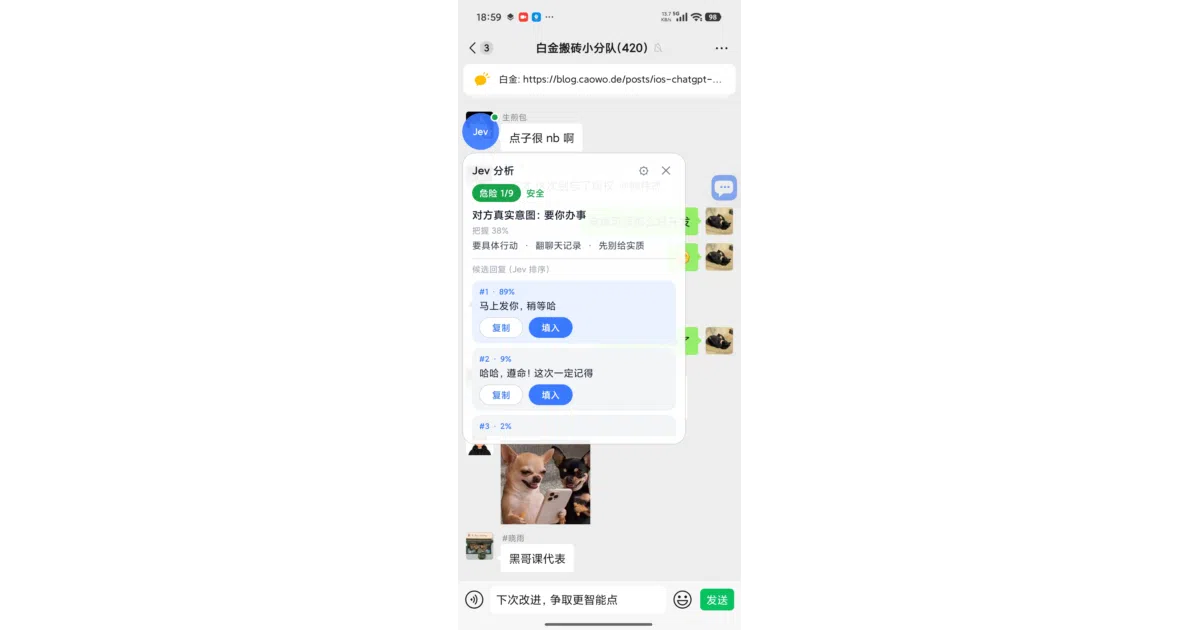
Jev Chat Assistant takes a different route. It uses Android’s AccessibilityService—the same infrastructure that powers screen readers like TalkBack—to read the UI hierarchy of whatever app is currently in the foreground. It does not modify target applications, intercept network traffic, or ask for credentials. It simply looks at what is already rendered on the screen, translates the visual conversation into a structured message list, and hands it off to a judgment engine. In the terminology of Android’s developer documentation, it retrieves window content and inspects the accessibility tree, treating your chat window as a document to be parsed rather than an API to be breached.
A Disguise Worthy of a System App
The trick is that many popular apps do not make this easy. WeChat, in particular, obfuscates its node IDs for any accessibility service that does not look sufficiently official. Jev Chat’s workaround is pragmatically devious: its service manifest disguises the app as SelectToSpeakService, a component of Google’s Android Accessibility Suite. WeChat’s defenses relax for what appears to be a system screen-reader, allowing Jev Chat to read bubble nodes by ID and determine who is speaking by whether the bubble sits on the left or right side of the screen.
For QQ, which exposes node IDs openly, the adapter is straightforward. For X (formerly Twitter), the app faces the opposite problem: Compose nodes carry no IDs and no text, but their content-desc attributes contain a structured string like “发件人:正文。时间。Read.” The adapter parses this description to extract sender and content. Feishu (Lark) is more hostile still: its chat bubbles are self-drawn canvases, so the accessibility tree contains only empty rectangles. Jev Chat’s Feishu adapter captures the bounding box of each bubble and runs Google’s ML Kit offline Chinese OCR locally to recover the text, using read-receipt icons to guess which side of the conversation a message belongs to.
This adapter architecture is the project’s real engineering win. Each supported app requires only a thin translator from its specific UI representation into a generic message format; everything downstream—the judgment model, the candidate generator, the floating overlay, and the text injection—is shared. The README notes that adding a new app means implementing one Kotlin interface and registering it in a list. The rest of the pipeline does not care whether it is parsing WeChat obfuscation or Feishu OCR output.
Judgment First, Generation Second
Once the messages are extracted, most AI assistants would simply dump the transcript into a large language model and ask for a reply. Jev Chat splits the work into two stages, and the split is what makes it architecturally interesting.
First, it sends the conversation context to TypeSafe AI’s Jev model, a “System One” classifier that does not generate text but makes fast, structured decisions. According to LangChain’s integration notes, Jev is trained with reinforcement learning for calibrated decisions and answers typed questions—Choice, Score, or yes/no—with associated probabilities and confidence levels. TypeSafe AI reports it can be up to two hundred times faster and four hundred times cheaper than comparable LLMs on classification tasks. LangChain’s documentation frames Jev not as a drop-in LLM replacement but as complementary middleware: LLMs manage open-ended reasoning, while Jev handles rapid structured decisions such as model routing. In a social context, this means the agent loop is short and cheap. You are not paying token costs for a full generation just to decide whether a message is sarcastic or urgent.
In Jev Chat, the model answers a fixed battery of questions about the conversation: the other party’s real intent, a danger level from one to nine, what they actually want, whether an immediate reply is warranted, and the best action to take. This takes about a second. Only after this triage does a generative model—defaulting to DeepSeek, though the user can configure OpenRouter, OpenAI, or Tongyi endpoints—draft three candidate replies. Jev then ranks the candidates by appropriateness, displaying them in a floating window alongside the strategic analysis. The user can copy a reply or tap to inject it into the host app’s input field; the app never triggers send itself, and it explicitly refuses to touch red packets, transfers, or payment buttons.
This separation of concerns is the inverse of the usual “one LLM to rule them all” approach. The structured judgment model handles strategy and calibration; the generative model handles tone and language. It keeps latency low, costs down, and prevents the AI from hallucinating high-stakes social decisions.
Local Context, Local Storage
Jev Chat also maintains a local knowledge base of notes and contact profiles, plus optional chat history that is turned off by default. When analyzing a conversation, the app injects relevant context: relationship notes, aliases across platforms so the same person on WeChat and QQ is recognized as one contact, and recently stored messages. A contact profile can list multiple aliases, so if your friend uses one handle on WeChat and another on QQ, the kernel treats both streams as the same person. This cross-app identity resolution is simple—string matching against session titles—but it hints at a larger ambition: a personal CRM that lives on the phone rather than in the cloud.
The retrieval system is deliberately primitive—keyword and tag matching against the session title or last six messages—avoiding the weight of a vector database. Everything lives in the app’s private directory, and the README is explicit that no conversation content enters logs or version control.
This privacy model is born of necessity. An accessibility service is a privileged position. As the Android Accessibility Suite documentation notes, these services can observe user actions, retrieve window content, and monitor typed text. Jev Chat mitigates the inherent creepiness by keeping keys in the app’s private space, sending chat content to external model APIs only at the moment of analysis, and offering a one-tap nuclear option to wipe the local knowledge base and history.
The Refreshingly Honest Limitations
What distinguishes the project from the usual AI hype is its candor. The README dedicates a full section to “Known Limitations” with the specificity of an engineering post-mortem. Xiaomi’s HyperOS aggressively freezes background processes, so the floating overlay may vanish until the user taps the chat again. Group chats are analyzed as one-on-one conversations, meaning the “other party” abstraction collapses into nonsense. The knowledge base lacks semantic search; if you do not tag your notes correctly, they will not surface. OCR misreads truncated or long messages. The English interface of X is untested. The Feishu adapter relies on read-receipt state to distinguish “me” from “other,” and if it guesses wrong, the user must manually correct the contact record.
These are not buried footnotes; they are front-page warnings. They signal that Jev Chat is a sophisticated personal experiment, not a venture-backed platform promising universal compatibility. It is glue code, in the best sense—pragmatic, modular, and aware that every bridge it builds could wash out with the next app update.
The Landscape It Inhabits
Jev Chat sits in a curious niche. Enterprise tools like OpenClaw archive and classify WeChat Work messages for compliance, auto-tagging IT support threads and syncing with CRM systems. Relevance AI sells no-code WeChat agents for e-commerce, handling order confirmations and loyalty programs through official mini-program integrations. OpenClaw performs real-time sentiment analysis and compliance checks on WeChat Work archives. These are heavy, server-side systems that require corporate credentials and data retention policies. Jev Chat requires none of that. It is lighter, dumber in the backend, and arguably more dangerous because it sits inside your personal conversations rather than atop a sanitized enterprise feed.
Jev Chat is the personal inverse: client-side, open-source, and built for the individual who wants an AI whispering in their ear during a casual conversation. It shares a technical kinship with a September 2025 OpenAI community experiment that used an accessibility service to inject ChatGPT responses into any Android text field, though that project was described by its author as a “fun experiment” with no production pretensions. Jev Chat is far more complete, offering a multi-adapter architecture, offline OCR fallbacks, and a calibrated judgment layer.
Outlook
The project already has macOS and Windows siblings, suggesting the authors view it as a cross-platform personal AI shell rather than a single Android curiosity. The macOS version, for instance, uses screen capture and a local small model for intent recognition, while the Windows version hooks into the WeChat desktop client via screenshot and offline OCR. Together they form a family of tools that share a philosophy: read what is visible, judge before generating, and never press send on the user’s behalf. Desktop support is planned using the same core insight—reading the screen rather than the API—relying on screenshot capture and vision models.
Whether the Android version survives the next WeChat obfuscation update is an open bet. But the underlying idea—that the accessibility tree is an underexploited, universal read-only interface to closed chat ecosystems—is likely to outlast this specific implementation. It is a hack, but a principled one, and it exposes how much valuable interface territory Android leaves lying around for anything clever enough to pretend to be a screen reader.
Sources
- What Is Jev? A Guide to TypeSafe AI's System One Model
- Android Accessibility Suite - Apps on Google Play
- OpenClaw WeChat Work Message Management: AI- ...
- Jarvis AI: Chat GPT, Bing, Claude, Bard, BOT
- Create an accessibility service
- 11 Use Cases for Suggest Reply AI That Drive Results (2026)
- OpenJarvis: Personal AI, On Personal Devices
- Using ChatGPT in (almost) any Android text input using an accessibility ...
- I Put an AI Agent Inside My WeChat in 15 Minutes
- I Built My Own JARVIS With AI (How You Can Too)
- Accessibility apps for Android - Text to Speech reminders for common ...
- WeChat AI Agents & Tools