hugohe3/ppt-master · 14 Aug 2026 · Feature
An Open-Source Harness for Native, AI-Generated PowerPoint Decks

Jordan Ellis
Senior Editor
PPT Master treats PowerPoint as a structured object model rather than a canvas, using AI agents to produce fully editable .pptx files with native shapes, charts, and animations from raw documents.
hugohe3/ppt-master
★58.1k stars Velocity · 7d +130 ★/day ↘cooling
star history
Flattened Slides and the Editability Gap
Most AI presentation tools fall into one of three traps. They generate image-based decks that stuff a JPEG into every slide, leaving you with a picture show wrapped in a PPTX file. They emit HTML presentations that look sharp in a browser but die the moment you need offline corporate compliance. Or they lock you into template fill-ins where every slide inherits the same rigid placeholders, turning nuance into a formatting error. The README for PPT Master draws this map explicitly, placing itself in a fourth, smaller category: native editable output built from real DrawingML shapes, text boxes, and charts.
The market is crowded with tools that choose the easier path. Gamma builds web-native card-based slides. Canva and Slidesgo offer thousands of templates and stock images inside walled gardens. Microsoft Copilot drafts inside PowerPoint itself, but only for subscribers already paying for the 365 ecosystem. The common thread is that your data leaves your machine, your cost is a recurring subscription, and your ability to tweak a single chart axis or speaker note is bounded by whatever the platform’s designers predicted. For professionals who live inside PowerPoint—consultants, investment analysts, sales engineers—this is a dead end. A slide you cannot edit is a slide you cannot trust.
Harness and Model
PPT Master’s central architectural bet is that the presentation problem should be solved by an agent, not an app. The project is not a monolithic SaaS product with a cute web interface. It is a skill, a workflow that runs inside AI IDEs such as Claude Code, Cursor, or VS Code Copilot. The README frames the relationship plainly: the tool owns the workflow, the model sets the ceiling. Together they form an agent that reads your source documents, designs a visual system, generates intermediate SVG geometry, and serializes the result into a native PowerPoint file.
This pipeline matters because it preserves the object model. Text remains editable text. Charts remain native Excel-linked charts. Shapes remain DrawingML vectors. The output supports slide transitions, entrance animations, and speaker notes that can be exported as narrated audio tracks. One of the project’s showcased examples is a narrated walkthrough of the Attention Is All You Need paper—every slide reads itself aloud when played in PowerPoint. That is not a gimmick; it is evidence that the file format is being treated as a programmable API rather than a final image.
The local-first posture is equally deliberate. Your PDFs, spreadsheets, and rough notes stay on your machine. The only external traffic is to the AI model provider. There is no separate SaaS subscription; the only cost is the token usage you already pay for. In an era where enterprise AI spending is forecast to hit $2.59 trillion but only a third of CEOs report seeing financial value, transparent usage-based billing is a quietly radical feature.
The Design Ceiling
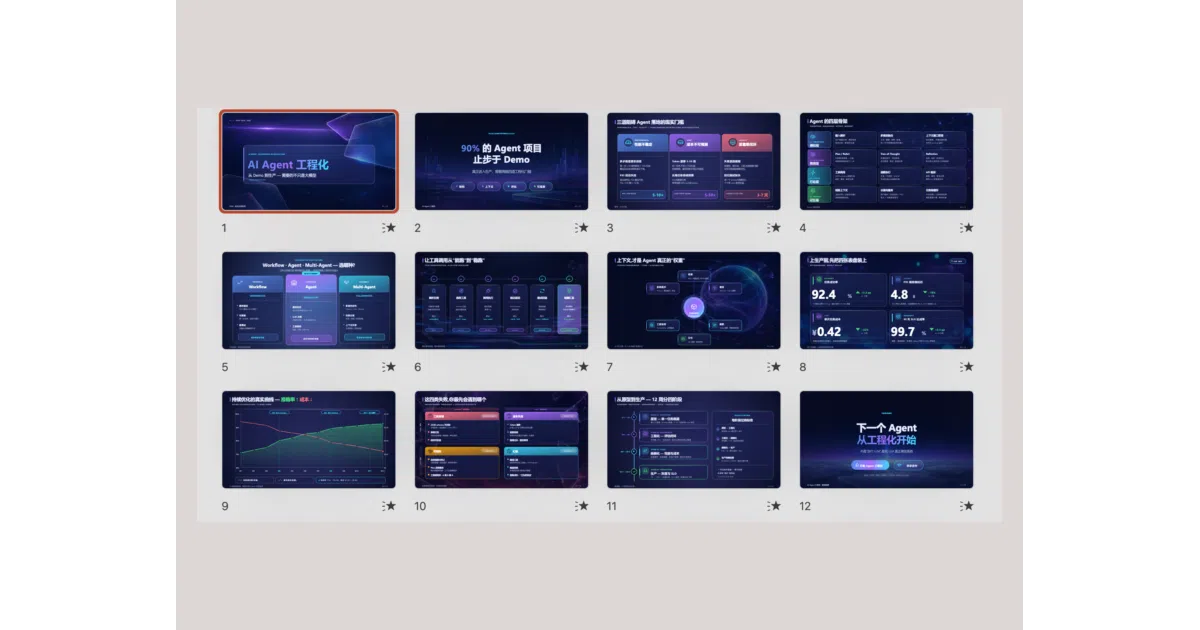
The examples are the argument. The project’s GitHub Pages viewer hosts decks that borrow from Swiss International Typographic Style, Bloomberg-style dark data dashboards, Memphis pop art, glassmorphism SaaS interfaces, and Risograph zine aesthetics. There is a Kubernetes architecture blueprint built from geometric shapes and a Brutalist AI newspaper layout. These are not auto-filled corporate templates. They are bespoke visual systems generated through multi-turn conversation with a large-context model, then rendered into native PowerPoint objects.
The README is candid about what it takes to reach that ceiling. The recommended stack is Claude Opus or Sonnet with a large context window—on the order of one million tokens—plus an image generation backend for visuals. Other models can drive the pipeline, but the quality floor drops accordingly. The project warns users not to expect a perfect deck in one shot, especially if they are running cheaper models. This honesty is rare in a space crowded with marketing that promises finished keynotes from a single sentence prompt. A 2Slides benchmark cited in industry coverage suggests AI-generated presentations are adequate for roughly eighty percent of business use cases, including internal meetings and training decks, but CEO keynotes and creative campaigns still demand heavy human refinement. PPT Master does not pretend otherwise. It offers a harness for the first draft, not a genie for the final pixel.
Position in a Crowded Field
PPTMaster.online catalogs more than fifty AI presentation tools, from AutoPPT and Beautiful.ai to Tome and Pitch. Most are closed SaaS platforms optimized for speed and ease. PPT Master occupies a narrow but important niche: it is for users who already live inside developer tools and want to own their output. It is MIT-licensed, model-agnostic in principle with support for Claude, GPT, Gemini, and Kimi, and it refuses platform lock-in.
That positioning carries trade-offs. It requires a local Python environment and an AI IDE such as Claude Code or Cursor, which limits its audience to users already comfortable with agentic workflows. Casual users will find Canva or Slidesgo faster. Windows users face extra friction, evidenced by the existence of a dedicated Windows installation guide. The FAQ is continuously updated from real user reports, suggesting the project is still smoothing out edge cases.
Yet the bet is that editability is the missing link for enterprise value. Presentations are recurring, manually intensive, and embedded in daily workflows. Tools that generate flat images or rigid web slides solve the creation problem but break the revision loop. PPT Master argues that a natively editable first draft—one where every element can be clicked, tweaked, and rebranded—is more valuable than a polished but frozen output.
The Tool, Not the Wishing Well
The README’s most important warning is philosophical. It states explicitly that the project is a tool the way PowerPoint is a tool: a designer can produce something stunning, while a novice will only ever touch basic features. The difference is the operator, not the instrument. This framing is a direct challenge to the broader AI presentation market, which sells the fantasy of zero-effort excellence.
The author, Hugo He, is a finance professional with CPA and consulting engineer credentials who built the project because he wanted AI-generated slides to remain editable. That origin story explains the project’s emphasis on compliance, precision, and native format fidelity over flashy web previews. It also explains the pedagogical undercurrent: the author wants users to learn Python and agentic workflows, with the deck serving merely as the excuse.
Outlook
Whether PPT Master scales beyond a niche audience of developers, consultants, and finance professionals depends on whether AI IDE adoption becomes mainstream. If agents become the standard interface for knowledge work, a harness that turns documents into structured PowerPoint objects is ahead of the curve. If users remain wedded to one-click web apps, it stays a power-user curiosity. The project is young, maintained primarily by its founder, and funded by API relay sponsors rather than venture capital. Its roadmap includes template-fill workflows that reuse existing .pptx designs, and its technical design documentation suggests SVG will remain the intermediate format of choice. The open question is not whether the pipeline works—it demonstrably does—but whether enough users are willing to climb the learning curve to wield it.
Sources
- AI Presentation Maker: Create presentations with AI - Canva
- Are AI-Generated Presentations Good Enough for ...
- PPT Master — AI generates natively editable PPTX - GitHub Pages
- what are some good ai tools to create powerpoint presentations? - Reddit
- Strong AI use case for companies: business presentations
- PPTMaster — Compare Best AI Presentation Tools (2026)
- AI PowerPoint Generator - Microsoft
- Top 10 Ai Adoption PowerPoint Presentation Templates in ...
- What is a slide master in PowerPoint? - Microsoft Support
- AI PowerPoint Generator | Build AI-Driven Presentations Fast
- Ai adoption PowerPoint templates, Slides and Graphics
- Free AI Presentation Maker - Slidesgo