heydamir/unslop · 31 Oct 2026 · Feature
The Purple Gradient Dies Here: A Skill That De-Slops Vibecoded UI

Grace Sullivan
Staff Writer
unslop encodes a designer's redline review as a Claude skill, on the theory that AI-looking interfaces are a structural problem, not a coat of paint.
heydamir/unslop
★1.4k stars
Every AI-built app now looks like it was shipped from the same factory. The purple-to-blue gradient hero. The soft glow behind the headline. An emoji doing the work of an icon system. Copy that shouts. Spacing that drifts a few pixels in every direction, because nobody was ever actually in charge of it. The tools that generate this stuff are getting faster — Figma’s own research says 89% of designers who increased AI usage report working faster, and 91% say output quality improved — and yet a certain kind of despair is spreading in parallel. A Reddit thread in r/UXDesign titled “The design drift created by vibe coding is insane” captures the mood, though its contents were inaccessible at time of writing; the title alone is doing a lot of load-bearing work.
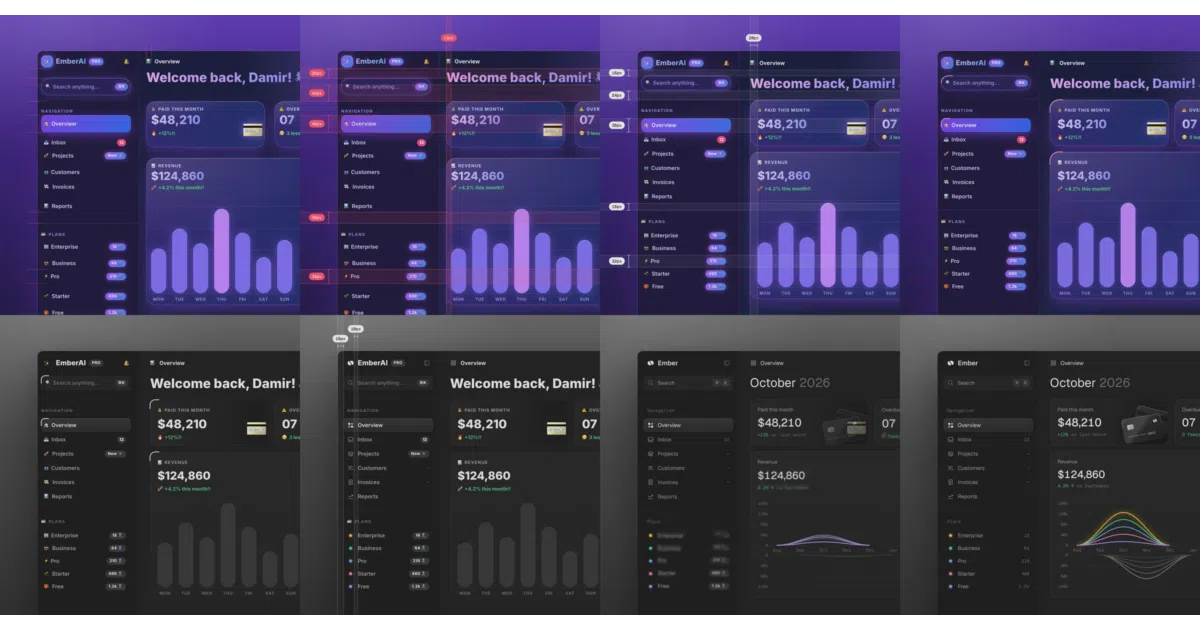
Into this walks unslop, a Claude skill by designer Damir Sokolovsky. It takes a vibecoded screen — dashboard, app, landing page, even a live site if all you have is a link — and turns it into something with its own character. It works across the usual stacks: Next.js, React, Vue, Svelte, Tailwind, or plain HTML and CSS. And it is, on inspection, much more interesting than “a prompt that makes things prettier,” because of what it assumes about why AI UI looks the way it does.
The slop is structural, not cosmetic
The name is not an accident, and the project is not alone in bearing it. “Unslop” has quietly become a genre label across the agent-skills ecosystem, and the writing-focused variants have produced the most useful theory about what “slop” actually is.
Consider the evidence from the text side. The unslop skill in Cursor’s plugin repository catalogs AI writing tells across seven categories — vocabulary, style, filler, jargon — with stable rule numbers other skills cite. Clayton Kim’s theclaymethod/unslop goes further, with a two-pass diagnosis-then-reconstruction system, an 8-criteria scoring rubric, and recorded benchmark runs where different models converge (or, in one case, oscillate forever without reaching clean). And a third unslop, listed on SkillsLLM, leans on a 2026 University of Maryland / Google DeepMind study of 61,608 texts: editing AI writing to remove clichés and surface artifacts barely moved structural detection accuracy, from 95.5% to 93.9%. The conclusion those authors drew is blunt. What betrays AI text is structure, not word choice. Swapping “delve” for “explore” fixes nothing.
Sokolovsky’s unslop applies the same diagnosis to interfaces, whether or not he’d phrase it that way. The purple gradient is not the disease; it’s a rash. The disease is that a model generating UI has no opinion about your product, so it reaches for the statistical center of its training data — and as Anna Arteeva argues in Design Systems for the Vibe-Coding Era, AI coding tools are biased toward the frameworks and styles they saw most: React, Tailwind, shadcn/ui, and the visual conventions that travel with them. A recent six-tool comparison run with an identical CRM-dashboard prompt found exactly this in Google Stitch: fast, multi-screen output that was nonetheless generic, with weak information hierarchy and layouts needing significant refinement before production. The tools generate the median of everything they’ve seen. The median is the slop.
What the skill actually is
Strip away the framing and unslop is a packaged workflow — instructions that teach Claude to behave like a designer doing a redline review, which is the part worth explaining, because the boring part is where the value lives.
It runs in three stages. First, an audit: it lists every sign of slop and where each one lives on the screen. Second, a direction: a character, a world, the one or two moments that carry the color, and a signature detail — all derived from what your product actually is, not from a generic style menu. Third, the passes: spacing, color, icons, copy, type, layout, details, visuals, and motion, in that order.
That ordering is the tell that a designer wrote this. Spacing comes first because spacing is the substrate — fix rhythm and alignment before touching a single hue, or every later decision sits on sand. Motion comes last because motion is the most seductive and least important layer, the one amateurs reach for first. A model left to its own devices will happily start with the fun parts. The skill’s job is essentially to impose seniority: do the unglamorous work in the unglamorous order.
Two design decisions in the skill deserve more credit than they’ll get. One: it proposes a direction and lets you steer before it edits anything, which turns a redesign from a gamble into a conversation. Two: if the screen is already good, it says so and suggests a few small refinements instead of redesigning it. That second behavior is nearly unheard of in AI tooling. Most generative tools are constitutionally incapable of leaving well enough alone — ask them to improve something and they will change it, because changing things is all they know how to do. A tool that can look at your work and say “this is fine” has been given permission to have taste, or at least to simulate restraint, which in this market amounts to the same thing.
The visuals handling is similarly pragmatic. Instead of the glossy abstract blob that AI builders love to drop into a hero section, the skill prefers to show your actual product, and when a scene or object is genuinely needed, it can generate one through an image service like fal, Replicate, OpenAI images, or Higgsfield. If none is connected, it offers to wire one up as an MCP server — and it shows the prompt and asks before every paid generation. Dashboards and apps, the README notes, rarely need one. This is a skill that knows its own scope.
A genre, not a project
It’s worth being precise about the landscape, because searching for “unslop” now returns a small crowd. There’s Sokolovsky’s UI skill. There’s the Cursor plugin for de-AI-ing prose. There’s theclaymethod’s heavily engineered writing rewriter with its frozen benchmarks. There’s the SkillsLLM-listed variant with its style-profile calibration. There is even an unslop.shop, which has nothing to do with any of this and sells American-made leather goods and raw honey — evidence, if you needed it, that the word has escaped containment.
The convergence is the story. Multiple people, independently, looked at machine output and concluded that the failure mode was sameness — a house style nobody chose — and that the fix was not better generation but a separate, adversarial pass that hunts the tells. On the writing side, that means structural patterns, not vocabulary swaps. On the UI side, it means a product-specific direction, not a different gradient. The word “unslop” is doing the work a term like “refactor” did for code: naming a distinct activity that everyone was already doing badly and informally.
The funnel is the business model
Here is the part that a purely technical reading misses: unslop is also, quite openly, a marketing artifact. The README ends with “Hire the unslopper” — Sokolovic will unslop one key screen in three days, built in your stack, for a fee. The license is CC BY 4.0, free for any use including commercial, as long as you credit him and link back to the repository. Every use of the skill is, structurally, an advertisement for the designer who wrote it.
This is not a criticism, and it’s more honest than most. The alternative business models in this space are subscriptions to generation tools — v0 at roughly $30 a month, Figma Make tiers, Relume, Framer — which all have an incentive to generate more, faster. A skill that fixes existing output, given away under a permissive license with a credit requirement, has an incentive to actually work, because its distribution depends entirely on people showing off the results. The README even includes a story-video feature: a square, sub-ten-second clip of your screen unslopping itself, ready to post, built on Playwright and ffmpeg. That feature exists because the before-and-after is the product. Sokolovsky’s “Unslopping series” on X, where the project originated, is the same loop: demonstrate the transformation publicly, let the transformations market the service.
The limits, stated plainly
What unslop is not: a model, an algorithm, or anything with a benchmark. It’s glue — well-authored glue, but glue. Its entire ceiling is Claude’s design judgment plus the quality of the instructions, and nothing in the sources quantifies how well it performs. The writing-unslop projects have rubrics and convergence benchmarks; the UI one has example screens and a demo video. Whether a Claude guided by a redline-review script consistently beats a human designer’s hour of work is exactly the kind of claim the repository makes by implication and never tests.
The paid image generation is a rough edge handled well — the skill asks before spending your money — but it’s still a dependency on external services for the visuals layer. And the attribution requirement in the license, while standard for CC BY, means every derivative carries the author’s name, which conveniently compounds the marketing loop.
The deeper open question is durability. If the generation tools internalize the lesson — if Figma Make or Stitch or v0 start producing product-specific, non-generic output natively, as Figma’s positioning suggests they’re all racing to do — the unslop pass becomes a transitional artifact, a patch for a defect the factories will eventually fix themselves. But that’s the optimistic timeline. The realistic one is that generation keeps getting faster and cheaper while taste stays scarce, and the gap between “built in seconds” and “looks like it was built for something” grows rather than shrinks. In that world, a skill whose whole job is closing the gap — by imposing order, sequence, and an opinion — is less a novelty than a job description. Someone was always going to write it. The mildly remarkable thing is that the first widely shared version reads like it was written by someone who has actually done the job.
Sources
- plugins/pstack/skills/unslop/SKILL.md at main · cursor/plugins
- My 7 Best AI Tools for UI Design
- The design drift created by vibe coding is insane. How are ...
- theclaymethod/unslop: An agent skill to de-AI your writing
- Free AI UI Generator - Prompt to UI in Seconds
- 10 Vibe Coding Examples to Jumpstart Your AI Workflow
- unslop - AI Agents on GitHub | SkillsLLM
- Generative UI and Outcome-Oriented Design
- 20 must-try vibe coding tools for inspired app creation
- Unslop | Discover Quality Goods
- 6 Best AI UI Design Tools I Tested With the Same Prompt ...
- Design Systems for the Vibe-Coding Era | by Anna Arteeva