elie222/inbox-zero · 11 Jun 2026 · Feature
The Open-Source Email Assistant That Wants to Replace Your Executive Assistant

Wei Chen
Contributing Editor
Inbox Zero packages LLM-powered inbox management, calendar intelligence, and cross-platform chat control into a self-hostable alternative to premium closed-source tools.
elie222/inbox-zero
★12.8k stars Velocity · 7d +24 ★/day ↘cooling
star history
The Hype Moment: Trending by Solving a Familiar Pain
Inbox Zero hit #1 on GitHub Trending and claimed #1 Product of the Day on Product Hunt, amassing roughly 9,000 GitHub stars and a reported 20,000 professional users. The attention spike is easy to understand: email remains the unglamorous center of professional life, and the project promises to automate the drudgery without surrendering your data to a black-box SaaS. It is pitched explicitly as an open-source alternative to Fyxer, with the added hooks of customizability, self-hosting, and a privacy-first posture that includes SOC 2 Type 2 certification and a no-training promise for user data.
The timing is opportune. The average professional spends a reported 4.1 hours daily managing email, and by 2026 the volume and complexity of digital communication have arguably outgrown traditional inbox organization. Large language models and agentic workflows have transformed email from passive repository into active workspace, or so the productivity literature claims. Inbox Zero rides this wave, but with a twist: it is not merely a wrapper around GPT-4 for drafting replies. It attempts to build a coherent system around the entire email lifecycle—triage, response, scheduling, filing, and analytics—accessible from web, Slack, or Telegram.
What It Actually Does: A System, Not a Feature
The core architecture is familiar modern web stack: Next.js, Tailwind, shadcn/ui, Prisma, Upstash, Turborepo. The product characteristics matter more than the plumbing. Inbox Zero integrates with Gmail and Outlook, reads your email and calendar, and operates across multiple surfaces: a web client, Slack, Telegram, with Microsoft Teams support pending.
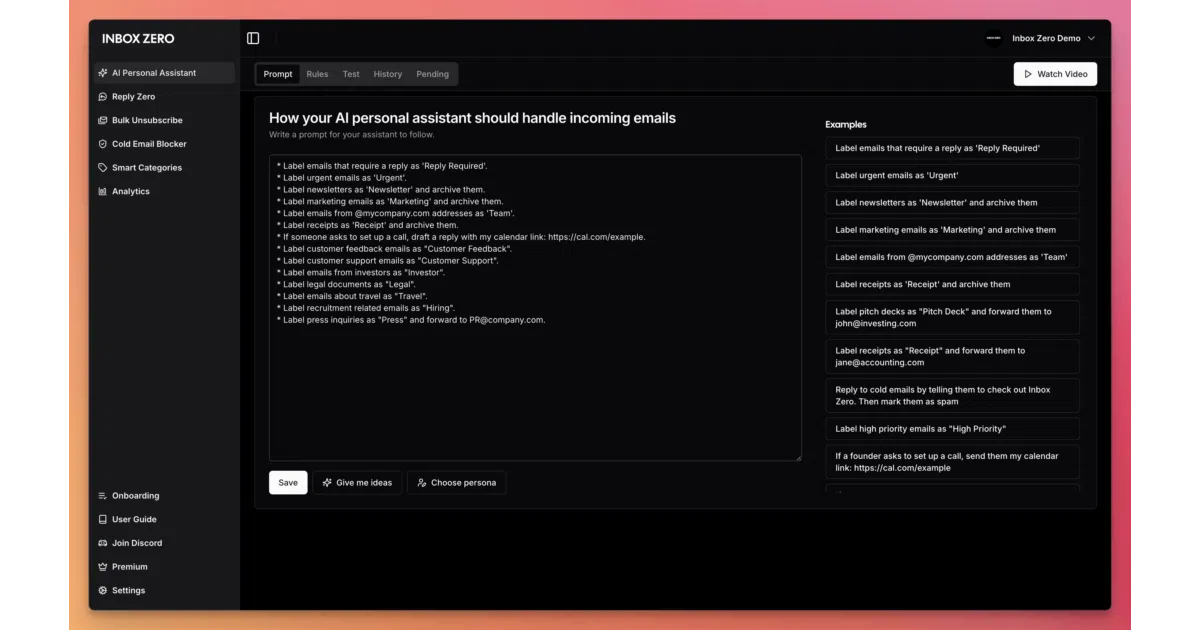
The feature set reveals the ambition. An AI personal assistant organizes the inbox and pre-drafts replies in the user’s tone and style. AI rules allow plain-English configuration of how the system should handle incoming mail. Reply Zero tracks emails requiring responses and those awaiting responses from others. Bulk tools handle unsubscribing and archiving. A cold email blocker filters unsolicited outreach. Email analytics identify top senders and inbox congestion patterns. Meeting briefs pull context from email and calendar to prepare the user before appointments. Smart filing automatically saves attachments to Google Drive or OneDrive. The Slack and Telegram integrations let users manage the inbox without leaving those apps.
This is not a single LLM feature bolted onto email. It is an attempt to construct an autonomous co-pilot that understands the user’s context across communication and scheduling domains. The plain-English rules engine is particularly notable: it attempts to bridge the gap between rigid filter logic and the nuance that NLP and ML are supposed to provide. The system parses unstructured text to identify dates, requests, urgencies, and intent—capabilities that the broader AI email assistant category has adopted as table stakes.
The Competitive Landscape: Incumbents, Interlopers, and the Self-Hosting Niche
The field is crowded and stratified. Microsoft’s Copilot for Outlook offers categorization, automated responses, draft generation, grammar refinement, and scheduling intelligence, with explicit privacy claims that customer data is not used to train foundational models. Google Workspace users get Gemini integration at roughly $7 per user monthly. For heavy individual use, Shortwave ($24/seat/month) and Superhuman ($30–40/user/month) compete on speed and AI generation. Mailbutler ($11/user/month) adds AI drafting to existing Apple Mail, Gmail, and Outlook clients without forcing a switch. Shared inbox tools like Front ($25/seat plus $20 AI add-on) target teams. HubSpot Sales Hub starts cheap but gates sequences behind expensive tiers.
Inbox Zero’s pricing undercuts most dedicated competitors: Starter at $18, Plus at $28, Professional at $42 per user monthly, with annual discounts and a 7-day trial. Enterprise adds SSO, SCIM, on-premise deployment, and dedicated account management. The self-hosting option is the real differentiator. A CLI wizard sets up Docker containers; local development requires Docker, Node.js 24+, and pnpm. The project provides Google and Microsoft emulators for local testing, suggesting serious attention to developer experience for operators who want to run their own infrastructure.
The open-source positioning matters strategically. User testimonials claim the tool replaced executive assistants and virtual assistants, captured authentic voice in drafts, and reduced clutter within minutes. These are the same value propositions that premium closed-source tools sell, but Inbox Zero offers an escape hatch: if the hosted version changes terms, degrades, or disappears, the code remains. For organizations with compliance requirements or distrust of third-party data processing, this is not a minor consideration.
Technical Depth and Rough Edges
The project is built as a Turborepo monorepo, which implies modularity and scalability for contributors, but also complexity for operators. The Docker-based self-hosting path is streamlined, yet production deployment, OAuth setup, and configuration remain sufficiently involved that the project maintains separate documentation for these concerns. The commit-SHA tagging on Docker images and formal version releases suggest disciplined engineering practices, though the README offers no specific performance benchmarks, latency claims, or throughput numbers.
What is unclear from the sources is how the system handles edge cases in email parsing: malformed threads, complex MIME structures, internationalization, or the long tail of enterprise email behaviors. The AI rules engine, while appealing in concept, is only as reliable as the underlying model’s interpretation of ambiguous instructions. The broader AI email assistant literature cautions that AI is not ready to work unsupervised, and Inbox Zero’s draft-first workflow—where the system suggests rather than sends—aligns with this conservative consensus.
The project’s security claims are specific and verifiable in principle: SOC 2 Type 2, no AI training on user data, self-hosting options. Whether these hold up to independent audit is not addressed in the sources. The privacy positioning contrasts with Microsoft’s similar claims for Copilot, suggesting that privacy-first marketing has become competitive necessity rather than differentiation.
The Inbox Zero Methodology: Borrowed Authority, Real Tension
The project’s name invokes Merlin Mann’s 2007 productivity methodology, which the BYU Marriott magazine notes became popular nearly two decades ago. Mann’s original insight was that “zero” refers to the amount of mental energy spent thinking about email, not necessarily an empty inbox. Asana’s resource page adds that Mann himself reportedly maintains a messy inbox, and that the method is often misunderstood. The five actions—delete, delegate, respond, defer, do—are simple in theory but demanding in practice.
Inbox Zero the software attempts to automate this methodology, which creates an interesting tension. The method emphasizes deliberate, mindful processing; the software promises to make that processing automatic. Whether automation preserves the method’s benefits or merely simulates its surface outcomes is an open question. The project’s mission statement—“help you spend less time in your inbox, so you can focus on what matters most”—echoes Mann’s finite attention argument, but the implementation substitutes algorithmic attention for human attention.
Outlook: The Self-Hosting Proposition in an Agentic Future
The project sits at an intersection of several trends: the maturation of LLM-based productivity tools, the resurgence of self-hosting among technically sophisticated users, and the persistent unsolved problem of email overload. Its trajectory depends on whether it can maintain feature parity with better-funded competitors while preserving its open-source advantage.
The broader AI email assistant category is evolving toward deeper integration—semantic search, sentiment and intent analysis, automated tagging, thread summarization, task extraction for calendar events, business intelligence surfacing, and sales lead enrichment. Inbox Zero’s current feature set covers much of this ground, but the pace of innovation in closed-source tools may strain a community-driven project.
The unresolved tension is between accessibility and control. The hosted version offers convenience; self-hosting offers sovereignty but demands operational competence. The CLI setup wizard lowers the barrier, yet production deployment with real email credentials, OAuth flows, and persistent data remains non-trivial. For the project’s target audience—professionals and organizations considering it as an executive assistant replacement—this operational overhead is the hidden cost of the open-source bargain.
Whether Inbox Zero becomes a sustainable alternative or a cautionary tale about open-source productivity tools depends on its ability to convert GitHub stars into sustained contribution, to keep its model integrations current as the underlying LLM landscape shifts, and to prove that its privacy promises withstand scrutiny. The attention is warranted; the endurance is unproven.
Sources
- Inbox Zero | Automate and clean your inbox
- 15 Best AI Email Assistants for Productivity in 2026 Tested - Gmelius
- Have you tried the "Inbox Zero" technique? Does it work?
- Best AI Email Assistant Tools for Gmail & Outlook 2026
- Inbox Zero
- Best AI assistant for email organization? : r/ProductivityApps - Reddit
- Beyond Inbox Zero: How I Built an AI Assistant to Reclaim My Digital ...
- Inbox Zero Method: 5 Steps to Manage Your Email [2025]
- AI Email Assistant for Outlook | Microsoft 365
- Inbox Zero v2 - open-source AI email assistant / manage from Slack
- Inbox Zero
- The 9 best AI email assistants | Zapier