dsh-tauri/deepseek-harness-desktop · 04 Oct 2026 · Feature
The Double-Click On-Ramp to DeepSeek's Agent Platform

Olivia Hartman
Editor
DeepSeek Harness arrived with 243,000 GitHub stars and a Node.js-shaped front door; this Tauri shell swaps the npm ritual for a download, with a self-healing kernel underneath.
dsh-tauri/deepseek-harness-desktop
★3k stars Velocity · 7d +322 ★/day ↗accelerating
star history
By the raw arithmetic of GitHub, DeepSeek Harness is one of the fastest-ascending repositories in the platform’s history: 243,000 stars, 29,200 forks, 20,736 commits, and a release cadence that still runs on alpha channels. It is DeepSeek’s open-source agent platform — public preview worldwide, built on Cordis’s “everything is a plugin” architecture — and its ambitions are total: organize files, analyze spreadsheets, draft documents, fix bugs, run background scripts, and write and install its own plugins through chat in Creator mode (DeepSeek Harness, deepseek-harness).
The front door, though, is developer-shaped. The official developer experience amounts to: have Node.js installed, then launch the web UI through an npm-mediated invocation. For the audience Harness explicitly courts — the official page leads with everyday work on docs, data, and slides, not terminal fluency — that is a wall, not a door.
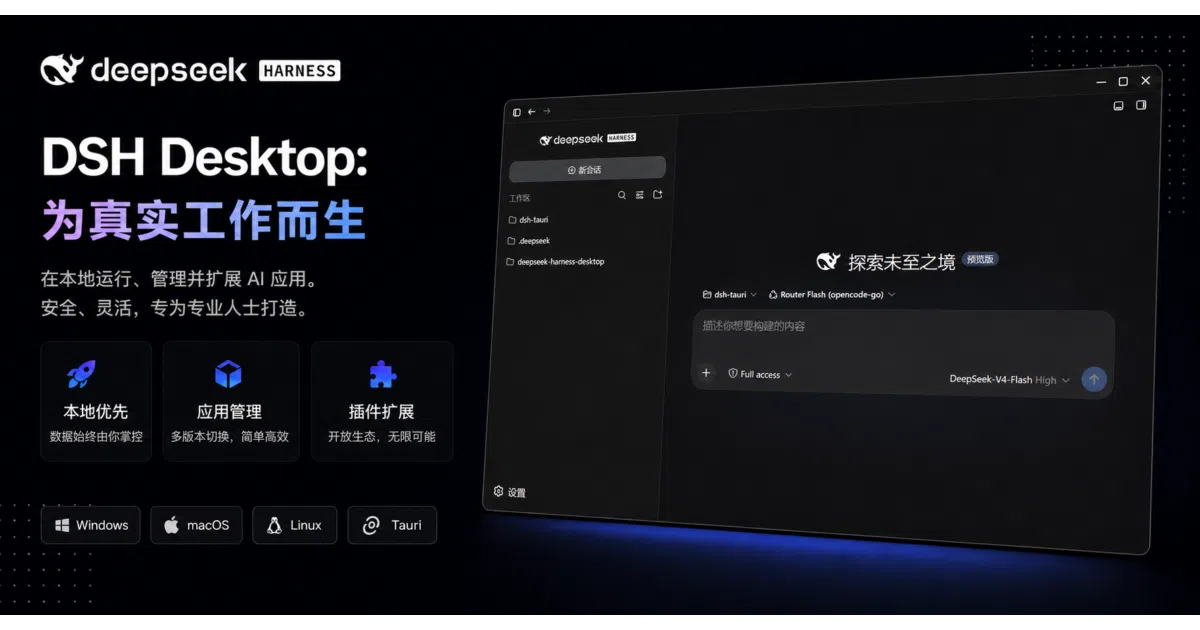
That is the gap this project fills. DeepSeek Harness Desktop is a third-party Tauri shell, built by an individual developer, that swaps the npm ritual for a download: no Node.js, no pnpm, no Docker. First launch assembles a bundled runtime and the Harness kernel; after that, everything runs on loopback. It arrived into a ready-made storm — a desktop build of Harness reached Hacker News to the tune of 410 points and 218 comments, a YouTube video declared that DeepSeek “finally” had a desktop app and that it was “insane,” and the author carried the build to r/DeepSeek and r/LocalLLaMA, where both threads sit behind a block wall in these sources, so the Reddit reception is unreadable (Hacker News, YouTube, r/DeepSeek, r/LocalLLaMA).
What it actually is
Strip the feature list and this is an installer, a process supervisor, and a native window around a web UI served from your own machine. The README’s architecture diagram is refreshingly candid about it: a React webview runs an install state machine, a download progress display, and then an iframe that loads the Harness web interface plus a sidebar of shell controls. A Rust backend does the unglamorous work — downloading and unpacking the runtime, managing the dsh process lifecycle, running health checks. Under the app’s data directory live a bundled Node.js v22.22.0 and a prepackaged Harness distribution. On launch, the shell boots the Harness web profile bound to loopback port 3080 and points the embedded webview at it. Windows, macOS, and Linux builds exist, with a bilingual, Chinese-first interface.
So yes: glue code. The README even names its reference implementation — n8n-desktop, a Tauri wrapper for the n8n automation tool — placing this squarely in the established genre of native window around a localhost web app. But glue is not a slur. Here, the glue is the product, and every joint in it is a decision someone had to get right.
The kernel is data
The most interesting idea in the repo is the update model. On every launch, the shell compares the local Harness kernel against the latest distribution from a companion packaging repo; if the local copy is stale, it re-downloads; if GitHub is unreachable, it keeps what it has. The README calls this “kernel self-healing,” and the name is earned, because upstream is a moving target the way few are — twenty thousand commits, breaking changes acknowledged in the project’s own warnings, version numbers still wearing alpha tags (deepseek-harness).
Freeze that kernel inside an installer and you ship stale software within the week. Bundle it and re-release the whole app on every upstream fix and you are maintaining a release pipeline for someone else’s sprint schedule. Splitting the difference — a thin, stable shell wrapped around a hot payload treated as a managed dependency — is the right engineering call, and it is the most transferable idea here. The app is furniture; the intelligence is data.
The smaller decisions are just as telling. If the machine already has a compatible Node or pnpm, the shell reuses it without modifying the system environment — the rare installer that respects both the developer’s setup and the non-developer’s absence of one. The Harness home directory is redirected into app data rather than the user’s home folder, a quiet answer to the dotfolder-spray argument that devoured a good chunk of the Hacker News thread. And the shell registers a dsh command-line entry on install, so terminal people are not second-class citizens in a GUI app.
Everything is a plugin, including the window
Upstream’s philosophical hook is the Cordis doctrine — tools, skills, the interface itself, all composable, all installable (DeepSeek Harness). The desktop shell honors the doctrine rather than fighting it: it does not fork the kernel to add desktop features. It ships a plugin — the Tauri message bridge — that gives the Harness web UI a channel to talk to its native shell. The desktop integration is itself an optional, installable plugin. The architecture eats its own dog food.
The first-run wizard leans in further, offering preset plugins with live install logs: a visual marketplace for browsing and one-click installing community plugins, desktop notifications when a turn completes — with separate toggles per result and keyword include/exclude rules — and a Windows terminal-inspector fix. It is a curated on-ramp into an ecosystem that is very much still under construction.
The doctrine has critics, and they are worth hearing. In the Hacker News thread, a user who likes Harness plenty observed that when core functionality is plugin-shaped, tweaking existing behavior still means maintaining downstream patches — they counted roughly twenty-five downstream commits and zero new plugins of their own. Another replied that the core exposes well-defined “extension seams” and patching should not be necessary at all. That argument — extensibility versus patchability — is the live tension in the whole ecosystem, and any shell built on top inherits it (Hacker News).
Privacy as positioning
When the desktop build reached Hacker News, the top-voted complaint was not about features. A user reported that the desktop build seemed to enable telemetry by default, while the plain web launch only collects telemetry for explicit user feedback; others posted configuration workarounds and wondered aloud what had already been sent before they found the switch (Hacker News).
Read this project’s pitch against that episode and it is hard to miss the aim: local-only on loopback, profiles and sessions and settings on the machine, telemetry off by default. That is the README’s word, to be clear — nothing in the available sources verifies the default independently — but as positioning goes, it is pointed.
The trust problem runs deeper than toggles, and the README is admirably blunt about it. This is an agent platform with local code execution — the project’s own security note says to use it in trusted, isolated environments — delivered through an unsigned, unnotarized binary that needs a one-time Gatekeeper override on macOS, and which downloads a runtime and kernel on first launch, then re-downloads payloads thereafter from a packaging repo run by the same author. The auto-update channel is the product, and the channel is only as trustworthy as its source. No amount of Tauri lightness changes that arithmetic; it is the structural question for this entire genre of agent shells.
A crowded shelf
The “AI desktop app” shelf is crowded, and most of it is a different product wearing similar clothes. doxdk/deepseek-desktop — 343 stars, seven commits, quiet since early 2025 — wraps the hosted DeepSeek chat service in a window with localStorage and cookie persistence: a browser with a logo. Chatbox, at 41,900 stars under GPLv3, is the mature incumbent: an Electron client for many providers, local data storage, mobile builds, and an agentic “Work Mode” pitched on its site. Both are windows onto remote services or APIs.
This one is a window onto a process — an agent runtime installed, supervised, and updated on your machine. That is a different object with a different threat model, and it is the distinction the whole category keeps blurring. It is also Tauri 2 rather than Electron, a choice the README advertises for smaller installers and lower memory — and for a shell whose entire job is hosting a webview around a localhost server, the lighter frame is the sensible one. The bilingual, Chinese-first interface is a reminder that DeepSeek’s home audience is a first-class citizen here; the official Harness page itself demos scheduling in Beijing time (DeepSeek Harness).
The demand, meanwhile, predates all of them. Privacy forums were already asking which local AI app is best back in early 2025, comparing Alpaca and Ollama-based options (Privacy Guides). The question was never whether people want a local AI app. It was who would package one honestly.
Open questions
Three things worth watching. First, whether DeepSeek’s own desktop app absorbs this niche — its telemetry default is currently the community shell’s best advertisement, but official distribution and notarization are advantages a solo project cannot match. Second, the license: the README describes MIT with an additional non-commercial rider, which is to say, not MIT — a field-of-use restriction is exactly the thing MIT exists to forbid. Anyone building on this should read that file twice. Third, adoption itself: the repo’s star and download counts are live badges, and the captured sources do not record their values, so whether the hype converts into users is genuinely unclear.
What is not unclear is the gap. The hottest agent platform on GitHub has a Node.js-shaped front door, and most of the people it is for do not have Node. Somebody was going to build the double-click version. This one happens to have thought about the boring parts — the update model, the environment detection, the home-directory hygiene — more carefully than the genre usually does. The pattern underneath, a stable shell around a self-updating intelligence, is the part worth stealing regardless of which shell wins.
Sources
- DeepSeek Harness | Explore the limits of intelligence
- Chatbox AI: Chat and Work with Multiple AI Models. All in One ...
- doxdk/deepseek-desktop
- DeepSeek Harness: Everything is a Plugin.
- chatboxai/chatbox: Powerful AI Client
- DeepSeek | Into the Unknown
- DeepSeek Harness Desktop for macOS and Windows
- Made an open source full featured AI desktop client app
- DeepSeek Finally Has a Desktop App — And It's Insane
- I built DeepSeek Harness for desktop
- Which Local AI App Is Best? - Questions
- Any Examples of Using DeepSeek for Computer-Use?