bookwjitchieni1986/blender-ai-mcp-addon · 20 Nov 2026 · Feature
Blender's AI Bridges Keep Dying. This One Brought a Reviewer.

Minh Tran
Contributing Editor
An MIT-licensed addon embeds a chat workspace, a model-agnostic agent pipeline, and an MCP server inside Blender itself — betting that the hard part was never the model, but the tool surface underneath it.
bookwjitchieni1986/blender-ai-mcp-addon
★2.5k stars
The field of projects that promise to let a language model drive Blender is starting to resemble a swap meet: crowded, enthusiastic, and with a worrying number of empty stalls. The comparison site blenderai.org claims searches for “blender ai assistant” are up 950% year over year, which explains the crowd but not the churn. One of the more instructive stalls is now explicitly vacant — PatrykIti/blender-ai-mcp is archived, discontinued as of October 2026, its author having concluded that the approach needed a rethink. Into this market walks mcp-for-blender-pro, a 1.0.0 release from a repo with the memorable handle bookwjitchieni1986, and it arrives with an argument worth taking seriously: that the interesting design decisions in Blender-AI integration are not about which model you connect, but about what happens when the model fails.
The inversion that matters
Most Blender-MCP projects share an architecture: a server process runs outside Blender, the addon inside Blender is a thin socket-listening shim, and an external client — Claude Desktop, Cursor, Codex — does the thinking. The community standard-bearer, formerly named blender-mcp, works exactly this way, with 276 commits and support for a long list of MCP clients.
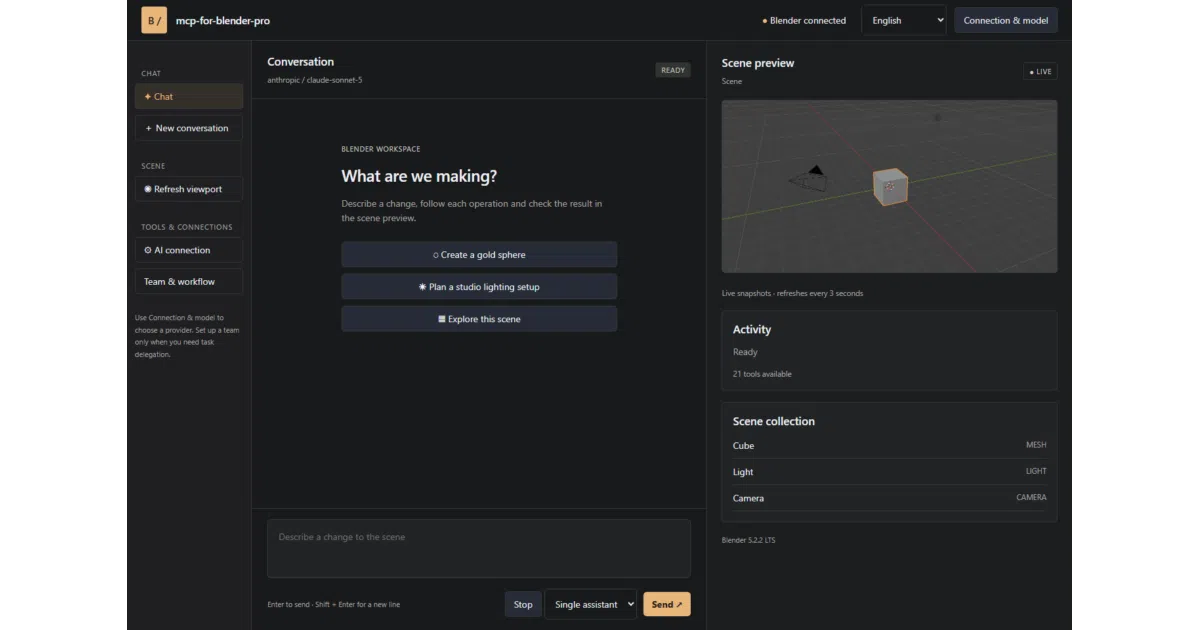
mcp-for-blender-pro inverts this. The MCP server is a built-in component of the addon, exposed over authenticated Streamable HTTP, and the primary interface is a companion “Studio” window inside the Blender workflow itself — chat, scene object listing, viewport snapshots, an approvals queue, and a task board. The external client (OpenCode, launched directly from the sidebar, or anything else that speaks the protocol) is the optional accessory, not the premise.
This is more than a packaging choice. It reflects a bet on where the friction actually lives. The external-server architecture optimizes for developers who already live in a terminal and want Blender as one more tool in their agent’s belt. The embedded architecture optimizes for artists — people for whom Blender is the workplace, and for whom a chat panel next to the viewport is the difference between using the thing and reading about it. The third-party coverage frames it exactly this way: an assistant that inspects the scene before acting, rather than a script generator that acts before understanding.
Twenty-one tools and the discipline of failure
The boring part of the project is the best part. Rather than exposing raw bpy — Blender’s Python API — to whatever model happens to be connected, the addon surfaces a fixed catalog of 21 scene tools: inspection calls like get_scene_info and list_objects, creation primitives for cubes, spheres, lights and cameras, editing operations for moving, duplicating, parenting and assigning materials, plus viewport screenshots, a Blender API lookup, asset search across Poly Haven, Sketchfab and Poly Pizza, and scene export.
Why does this matter? Because the discontinued project up the street wrote the postmortem. The PatrykIti archive is unusually candid about why raw bpy scripting fails in production: Blender’s APIs drift across versions, context-sensitive operators blow up when the object/mode/selection state is wrong, raw scripts return weak error feedback, and vision alone can’t be trusted as final verification. Its answer was a “truth-first” layer of deterministic measurement and assertion tools. mcp-for-blender-pro’s answer is shallower but pointed the same direction — a stable, small, typed tool surface that gives the model context before it acts and predictable errors when it acts badly.
The failure discipline extends to the workflow engine. Tasks run sequentially, so scene edits stay ordered — a quietly important decision in a tool where two agents mutating the same scene concurrently is a recipe for garbage. A task that fails review gets exactly one correction attempt; a second failed review stops the workflow entirely. In a field where the demo always works and the second hour always doesn’t, an explicit “stop after two strikes” policy is the kind of unglamorous engineering that separates a tool from a toy.
A manager, some workers, and a reviewer walk into a viewport
The headline feature is the multi-agent mode: a Manager model that decomposes a request into assignments with acceptance criteria, Worker models that perform scene operations, and Reviewer models that approve results or return specific findings. The task board exposes assignments, attempts, and review findings as work progresses. For smaller jobs, a single-assistant mode does conventional conversational editing.
It’s tempting to read this as agent-theater — the word “multi-agent” does attract attention, and Microsoft’s own taxonomy of agent types is careful to note that most useful “agents” are still non-autonomous, operating under human guidance within strict rules. But the design here is more conservative than the marketing suggests, and that’s a compliment. The roles are sequential, not concurrent. The reviewer is a model looking at viewport screenshots and scene state, not an oracle. The human retains approval gates and named undo steps for every mutation. What the project has actually built is less a swarm and more a structured pipeline with a QA checkpoint — closer to a code-review workflow than to the autonomous agent teams that the broader Copilot Studio discourse is selling to enterprises.
The model-agnosticism is real and load-bearing, though. OpenAI, Anthropic, Google Gemini, OpenRouter, OpenCode Zen, local Ollama models, and custom endpoints speaking any of three protocols are all supported, with saved connections that can hold multiple keys per provider. The arena comparison site treats “no model lock-in” as one of its seven scoring criteria and finds most tools fail it; this project passes by construction. The Ollama path in particular means the whole pipeline — chat, agents, scene operations — can run offline, which for studios with unreleased assets is not a nice-to-have.
The graveyard next door
Context is unkind to this genre, and honesty requires saying so. The ahujasid project is the incumbent, with years of commits, broad client support, and sponsorship. The PatrykIti project is the cautionary tale, discontinued despite — or because of — a genuinely sophisticated architecture. The commercial comparison pages, meanwhile, are openly hostile to the category: one roundup dismisses most plugins as “wrappers around web APIs” and pushes web-based generators instead, while 3D-Agent charges from $19 a month for a purpose-built, panel-based alternative and claims 13,400 users. There is even a Reddit thread titled, in full, “Blender MCP - can anyone actually get good results?” — a question that answers itself by needing to be asked. (The thread itself was inaccessible at the time of writing, blocked behind a network-security wall, so the sentiment of the replies remains unverified.)
Against that backdrop, mcp-for-blender-pro’s differentiators are its in-Blender workspace, its reviewer-gated pipeline, and its embedded server. Whether those are enough is an open question the sources cannot settle: there are no adoption numbers, no benchmarks, no third-party reviews beyond a single news writeup, and the repo’s own release is a 1.0.0 with no visible track record.
What it doesn’t do
The README is commendably frank about its limits, and they are worth listing because they define the project’s honest scope. The release bundle targets Windows x64 only — Mac and Linux artists are simply out of luck, a strange constraint for an MIT-licensed tool in a community where neither platform is exotic. Chat history lasts for the current session and then it’s gone. Python tool validation “helps catch disallowed operations; it is not a security sandbox” — and the tool list includes execute_code, which means an external client with access to the endpoint can run arbitrary Python in Blender’s process. The addon’s own documentation says external MCP clients manage their own approval policies, which is a polite way of saying the guardrails end at the property line.
The asset integrations have a similar asterisk: Poly Haven, Sketchfab, and Poly Pizza are wired in, but license compliance is the user’s job, not the tool’s. And the news coverage repeats the caveat about executing untrusted code, which in a creative tool connected to the open internet is not a theoretical concern.
None of these are disqualifying. They are the ordinary rough edges of a young, independent project. But they are the edges, and anyone evaluating the tool against a commercial alternative should weigh them.
The Foundation is coming
The larger strategic question hangs over every third-party Blender-AI project: the Blender Foundation itself has entered the field. According to the 3D-Agent overview, the Foundation now ships an official Lab MCP Server for Blender 5.1 and later, letting external AI clients control the application natively — a development that followed a May 2026 AI usage post from the Foundation. (The Foundation’s own Lab page was unreachable at the time of writing, sitting behind a verification wall, so the details of the official server remain secondhand.)
When the platform vendor ships the protocol layer, third-party integrations survive by competing on everything above it: the workspace, the workflow engine, the review discipline, the model choice, the asset pipelines. That is, almost precisely, the list of things mcp-for-blender-pro has chosen to build. The embedded MCP server may eventually be redundant; the Studio workspace and the reviewer-gated task board would not be.
The honest verdict is that this is a thoughtfully scoped entry in a genre with a high mortality rate. It has absorbed the right lessons from the failures around it — stable tools over raw scripting, sequential execution over concurrent chaos, bounded retries over infinite optimism, human approvals over trust. Whether it outlives the graveyard depends on things no README can promise: maintenance cadence, cross-platform support, and whether artists who try it in week one are still using it in month six. The 950% search spike guarantees an audience. It does not guarantee a survivor.
Sources
- MCP Server
- 10 AI 3D Tools to Supercharge Your Blender & Unreal Engine Workflow in ...
- Exploring different types of AI agents and their use cases
- ahujasid/mcp-for-blender: Community plugin to control ...
- Best Blender AI Assistants in 2026 | Arena-Ranked Comparison
- Build Automated Agents, Workflows, and Apps - New in Copilot Studio
- Blender MCP - can anyone actually get good results? : r/LocalLLaMA
- Blender gets AI assistant with multi-agent workflows
- Copiloting Creative 3D Scene Modeling and Visualization with ...
- PatrykIti/blender-ai-mcp: [Project discontinued] Production-shaped ...
- AI-Powered 3D Modeling Tools for Blender (2026)
- What's new in Copilot Studio: May 2026 updates and features