anywhere-labs/dsh-desktop · 03 Sep 2026 · Feature
Bringing DeepSeek Harness From Terminal to Taskbar

Giulia Conti
Editor
DSH Desktop wraps DeepSeek Harness’s local Web UI into a native macOS and Windows application, eliminating Node.js setup and CLI commands for users who want an agent runtime that behaves like ordinary software.
anywhere-labs/dsh-desktop
★33.1k stars Velocity · 7d +232 ★/day ↗accelerating
star history
The Last Mile of Local AI
DeepSeek Harness is an open-source agent runtime from DeepSeek. In its official form, it is a Node.js application that you launch from a terminal, after which it exposes a local Web UI in a browser tab. That workflow is familiar to developers, but it is a friction point for everyone else. DSH Desktop, a community project built in the Electron stack, treats that friction as the primary problem to solve. It bundles the Harness backend into an installable macOS or Windows application that manages its own lifecycle, renders the interface in a dedicated window, and stores user data outside the application directory so that upgrades never overwrite profiles, sessions, or model settings.
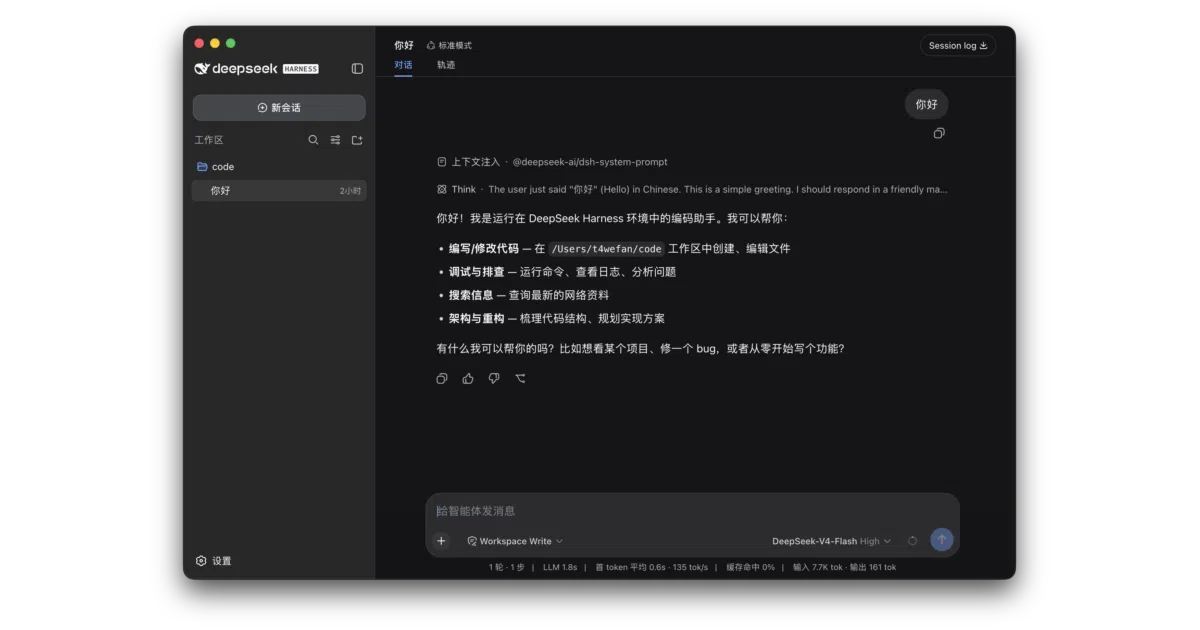
The project is not an official DeepSeek product. It is MIT-licensed community glue, maintained separately from the core Harness repository, and it has accumulated roughly 3.9k stars on GitHub under the dataelement organization. Its value proposition is not a new model or a novel agent algorithm; it is the packaging. In a landscape where most open-source AI infrastructure still ships as repositories with README instructions, DSH Desktop argues that the last mile—installation, process management, and native OS integration—deserves its own engineering effort.
What the Wrapper Adds
Where the official Harness experience requires a separate CLI or browser tab, DSH Desktop starts and stops the local runtime automatically, manages ports and process lifecycles, and opens straight into the full interface as soon as the backend is ready. The application is built on Electron, which in 2026 remains the dominant framework for shipping web-based tools as desktop software. That choice trades a larger installer footprint for a predictable rendering layer and direct access to system-level APIs: native file dialogs, menu bars, system trays, and auto-update feeds.
The desktop build adds several conveniences that the terminal-first distribution lacks. A native directory picker lets users add and manage project workspaces without typing paths. Third-party model support is handled through a first-run catalog—OpenAI, Anthropic, Google Gemini, Moonshot, MiniMax, Zhipu GLM, and others—where you select a provider, paste an API key, and the routing and model lists are configured automatically. Keys are written only to the local OS credential store, not into plaintext configuration files. For portability, the app can import and export complete Agent presets as .dshpreset packages, with conflict checks and a trust warning before installation.
When things go wrong, the wrapper provides recovery mechanisms rather than stack traces. It detects startup and frontend plugin failures, keeps diagnostics in harness.log, and offers a non-destructive Safe Mode that temporarily blocks third-party plugins so the user can still reach the interface. Auto-updates are checked shortly after startup and every six hours thereafter, but the app asks before downloading and waits for explicit user approval before restarting. macOS releases are code-signed and notarized by Apple; Windows x64 installers are code-signed, though Windows security warnings may still appear gradually as the publisher builds download reputation.
The Plugin Paradox
DeepSeek Harness itself is built on Cordis and follows an “everything is a plugin” architecture. Model adapters, tool registries, session logging, and the agent loop are all plugins that can be composed or replaced through configuration. The DSH Desktop project acknowledges this philosophy and admits an elegant long-term ambition: it wants to stop being a standalone wrapper and eventually become a first-class plugin within the Harness ecosystem. In that future, service management, system integration, and the plugin market would all be delivered through Harness’s own extension mechanism rather than through a separate monolithic host.
For now, that remains aspiration rather than architecture. The desktop application is still a conventional Electron host, and several of its most-advertised capabilities—phone remote control, a plugin marketplace, and IM channel integrations for WeChat, Feishu, Discord, and WhatsApp—carry “coming soon” badges. The maintainers are transparent about this, noting that the desktop is not yet delivered as a Harness plugin and that the plugin-oriented reorganization is still in development. The current release is best understood as a hardened, user-friendly launcher rather than a fully modular desktop portal.
Community Position and Ecosystem
Because it is open source and unofficial, DSH Desktop has attracted a small but active satellite ecosystem. Community projects include an “Orange Book” of tested prompts and session records, an Awesome-list for discovering Harness plugins, alternative TUIs and Web UI skins, and Agents-Anywhere for mobile remote control. This orbit of tools suggests that DeepSeek Harness has found an audience beyond the core researchers who typically tolerate CLI workflows, and that the demand for a consumer-grade wrapper is genuine.
In the broader field of AI agent frameworks, most projects remain either cloud-hosted services or developer-centric command-line tools. DSH Desktop occupies a narrower but useful niche: local-first, cross-platform, and designed for users who want the agent runtime on their own machine without configuring a JavaScript environment. It is the kind of project that thrives when upstream is powerful but unfriendly to casual adoption.
Preview Status and Rough Edges
Expectations should be calibrated to the fact that DSH Desktop is an early preview built on the rapidly evolving @deepseek-ai/dsh@0.1.2-alpha.4 upstream. The application is stable enough for daily use, but it is clearly learning how to be desktop-native. Phone access, when it arrives, will work by pairing a mobile device over the local network or through an optional temporary Cloudflare Quick Tunnel; the desktop must explicitly approve the connection before the phone can resume a session. Disconnecting the phone invalidates the mobile session entirely, which is a sensible security posture for a local-first app but also a reminder that these features are still being figured out.
The project’s honesty about its limitations is one of its better qualities. It does not claim to extend Harness’s reasoning capabilities or to replace the official distribution for core development. It simply packages what already exists into a form that installs like Slack, runs like VS Code, and behaves like ordinary desktop software. For many users, that is exactly enough.
Sources
- dataelement/dsh-desktop: DSHDesktop
- Designing a plugin framework for an application with ...
- DAP for Desktop Applications: Why It Often Fails
- DSH Desktop — Desktop app for DeepSeek Harness
- Top 7 desktop app frameworks in 2026 | MōBrowser Blog
- Modular (plug-in like) desktop application
- DSH (Data Safe Haven) Portals - London
- Plugin Architecture in Web Apps (Examples or Code ...
- Developing an app extensible with standalone executable ...
- Data Safe Haven User Guide & FAQs - London
- Desktop Application Development Guide (2026)
- Modernize applications with Power Platform