Comfy-Org/ComfyUI · 12 Aug 2026 · Feature
ComfyUI Is the Node Graph Engine Powering Professional Visual AI

Grace Sullivan
Staff Writer
An open-source node graph interface that lets professionals chain models, parameters, and processing steps into reproducible generative AI workflows for images, video, audio, and 3D.
Comfy-Org/ComfyUI
★142.7k stars Velocity · 7d +654 ★/day ↗accelerating
star history
From Prompt Box to Patch Bay
The open-source generative AI market has developed a strange habit of treating every new checkpoint as a product launch. In practice, a diffusion model is just a weight dump; the actual product is the control surface around it. ComfyUI, maintained by Comfy Org, has become that surface for a large swath of the visual AI community. It is not a diffusion model, nor is it a simple web wrapper. It is an open-source inference engine and node-graph environment that treats image, video, audio, and 3D generation as a visual programming problem. In doing so, it has effectively become the default workshop for professionals who want to compose pipelines rather than pray over prompt boxes. It is available as a desktop application for Windows and macOS, a portable package, or a manual install across all major GPU vendors [1].
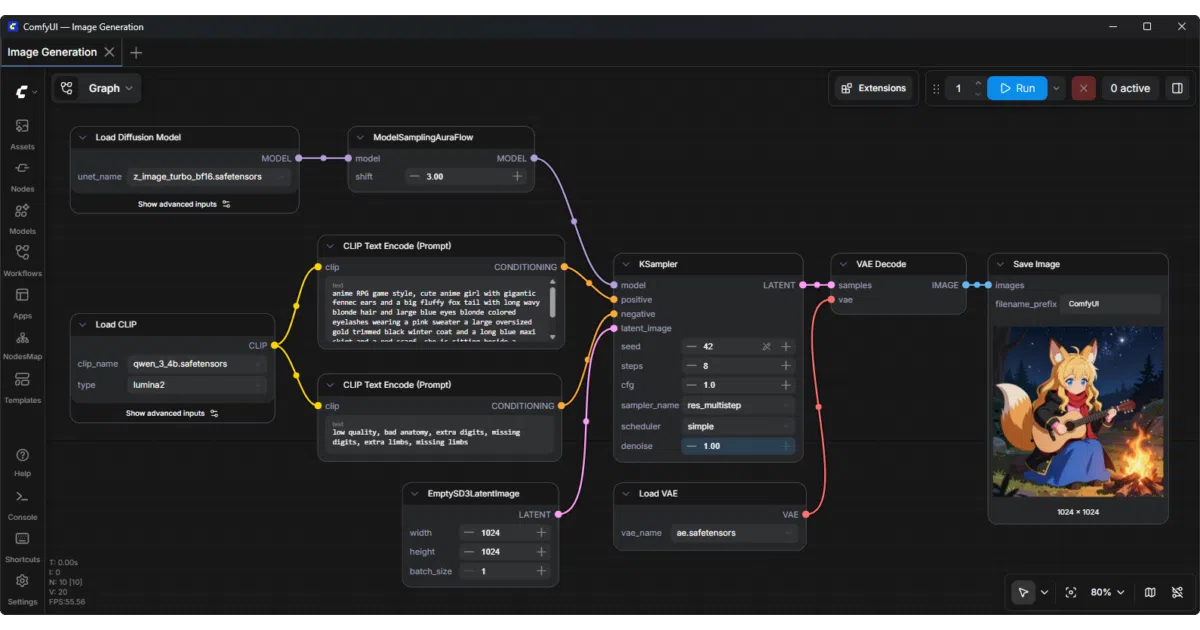
Early Stable Diffusion interfaces offered a linear path: prompt, sampler, output. That works for a single model, but the ecosystem quickly fragmented into specialized checkpoints, LoRAs, ControlNets, inpainting adapters, video diffusion models, and 3D generators. ComfyUI entered this landscape as a node-based GUI where users chain discrete blocks—loading a checkpoint, encoding a prompt, applying a sampler, upscaling—into a directed graph on an infinite canvas [5]. The metaphor is less web form and more audio patch bay: every cable carries a tensor, and every knob exposes a parameter.
This shift from prompt engineering to pipeline engineering is the hype moment. As open-source image generation models multiplied—FLUX.2, SD3.5, HunyuanDiT, Qwen Image, Lumina Image 2.0, and dozens more—the community needed a neutral ground to wire them together [7]. ComfyUI became that ground not by building a better model, but by building a better socket set. The project bills itself as an engine for visual professionals who demand control over every model, every parameter, and every output [1], and the node graph is the physical manifestation of that promise.
The Insight: Execution Graph as Interface
What separates ComfyUI from a diagramming toy is that the graph is the runtime. The engine analyzes node dependencies, builds an execution graph, and runs operations in parallel where the data flow allows [11]. Change a prompt at the end of a chain, and the system does not necessarily re-run the earlier checkpoint load or conditioning steps. In a domain where inference is expensive and iteration is the norm, treating the UI as a dependency graph rather than a script is the difference between tinkering and engineering.
The project also embeds the full workflow—nodes, connections, seeds, parameters—into generated PNG, WebP, and FLAC files [11]. Drag that file back onto the canvas, and the entire pipeline reconstructs itself. The output image is also its own source code. This displaces the black-box generation model: reproducibility becomes a file format feature, not a documentation chore. An asynchronous queue system lets users line up multiple generations without blocking the canvas, a necessity when a single workflow might take several minutes to resolve. The core is designed to run fully offline, refusing to download weights or phone home unless explicitly directed.
A Universal Dock for Diffusion Models
ComfyUI’s neutrality is its moat. The core engine natively supports a sprawling list of open-weight architectures—SD 1.x through SD3.5, SDXL, Stable Cascade, AuraFlow, FLUX and FLUX 2, HiDream, Lumina Image 2.0, Z Image, and newer arrivals like Qwen Image and Ernie Image [11]. It does not stop at images. Video pipelines cover Stable Video Diffusion, Mochi, LTX-Video, Hunyuan Video, Wan 2.1 and 2.2. Audio includes Stable Audio and ACE Step. Even 3D generation is wired in via Hunyuan3D 2.0 [1].
For models without local weights, API nodes call closed endpoints such as Nano Banana, Seedance, and Hunyuan3D through the Comfy API [1]. This bridges the open and closed ecosystems in a single graph, letting users mix local FLUX checkpoints with paid video generation in one workflow. The project is explicitly model-agnostic, which has allowed an ecosystem of over 60,000 custom nodes to grow around it [1]. The ecosystem is already deep enough that users are building dynamic switch nodes to route between checkpoints based on input validity [8]. The ComfyUI Manager handles installation and updates for these extensions, turning the application into a package manager for generative operations [5]. A separate desktop application and a cloud-hosted version lower the barrier to entry, while the core remains open and offline-capable [11].
When the Graph Becomes the Product
The node graph is not merely an authoring tool; it is becoming the product artifact itself. Workflows can be saved as JSON, shared on community hubs, or embedded directly in output files. Comfy Org has leaned into this by offering App Mode, a simplified UI that hides the graph behind a consumer-friendly interface while preserving the underlying node structure [1]. Users can flip back to the full graph at any time. This dual-layer design attempts to solve the classic power-usability trade-off: beginners get a button, professionals get a breadboard.
Commercial platforms have noticed. RunDiffusion and similar services host ComfyUI workflows as production endpoints, offering managed infrastructure around user-built graphs [10]. The Comfy API and Cloud API allow teams to turn a local experiment into a remote endpoint without rewriting the pipeline in a traditional framework [1][9]. Enterprise offerings promise infrastructure for organizations that want to keep the creative engine inside their own walls [1]. In this sense, ComfyUI is doing for diffusion inference what Jupyter did for data science: it collapses the gap between experimentation and production by making the environment itself portable.
Complexity and the Breaking Point
The cost of this flexibility is complexity. A node graph with dozens of custom nodes, switch statements, and nested conditioning can become, as one community member put it, overly complicated and not worth sharing [8]. Beginner guides still spend significant time explaining how to copy and paste nodes [5], and the learning curve is noticeably steeper than more linear interfaces like AUTOMATIC1111. The ComfyUI Manager is practically mandatory to navigate the jungle of third-party extensions [5]. ComfyUI is not glue code—it is a sophisticated host—but it demands that its users think like systems integrators. The power is real; the spaghetti is optional but tempting.
Beyond Images
The project is currently expanding its scope through the Model Context Protocol and AI agent integrations, positioning the node graph as an action space for autonomous tools [1][9]. A CLI tool is in beta for terminal-driven generation, and documentation suggests a future where agents invoke workflows through MCP servers rather than clicking nodes [9]. The community shares thousands of workflows, and the project’s own site hosts case studies from architecture, advertising, and gaming studios that have adopted the engine [1].
Whether the node abstraction will gracefully absorb every future modality—video, audio, 3D, and agentic orchestration—or eventually collapse under its own weight, is an open question. The weekly release cadence across core, desktop, and frontend repositories suggests an organization trying to scale a moving target. For now, ComfyUI has established a simple rule in the visual AI landscape: the model is interchangeable, but the graph is the engine.
Sources
- Comfy - Professional Control of Visual AI
- The most popular locally run image generation models and UI's in 2025
- What are your must-have ComfyUI workflows? : r/StableDiffusion - Reddit
- Stable Diffusion Online
- Beginner's Guide to ComfyUI - Stable Diffusion Art
- ComfyUI
- The Best Open-Source Image Generation Models in 2026 - BentoML
- ComfyUI and open-source AI nodes for workflow management - Facebook
- ComfyUI Official Documentation - ComfyUI
- RunDiffusion - All the Best AI Tools. One Platform. One License.
- ComfyUI - AI Tool - HowAIWorks.ai
- r/comfyui